Skip to content

Posegram

Which part of the body moved, and when—and the same question asked on the image's own axes so it can be laid beside a motiongram.
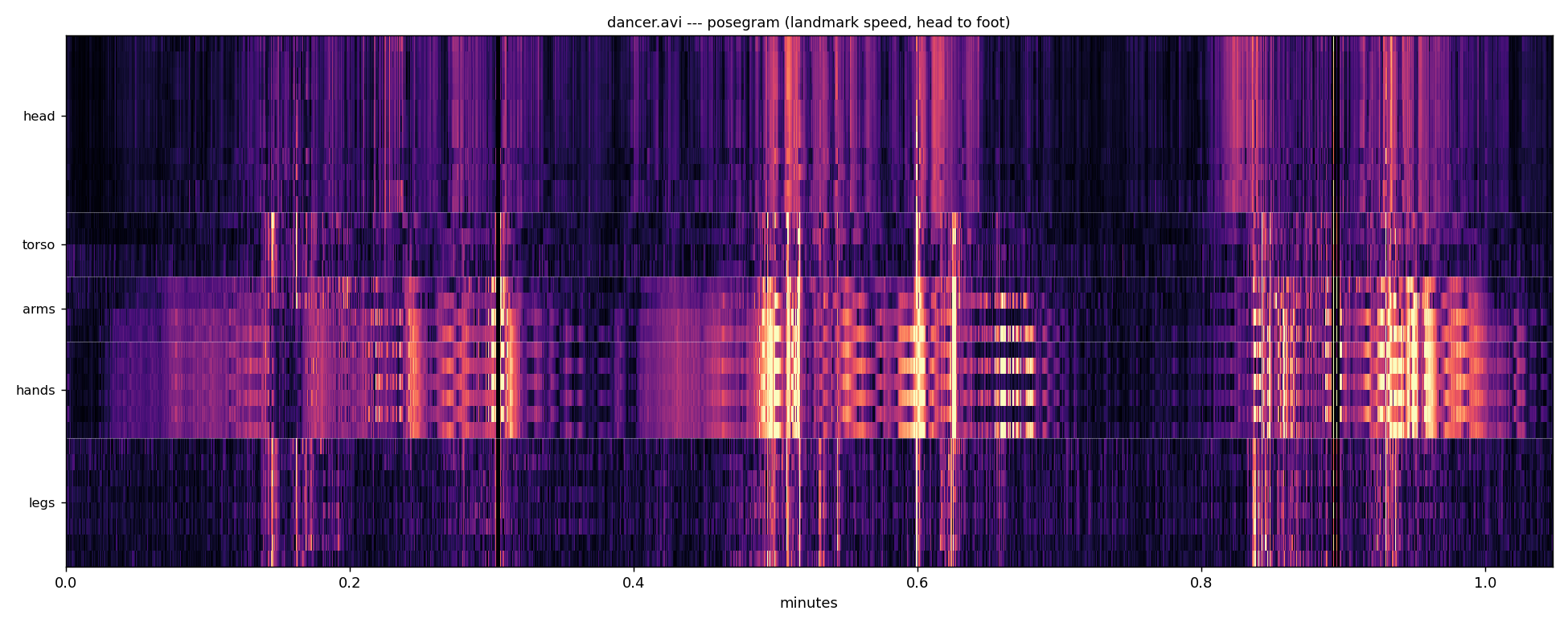
Posegram of the bundled dancer example

The bundled dancer.avi: one row per landmark, head to foot, coloured by that landmark's speed. The dance lives in the arm and hand rows; the legs stay dark.

pose_waterfall and the trajectory renders say where the body went, pose_segments how its limbs were angled, pose_center how its centre moved. None of them answers what a motiongram answers for pixels: what was moving at 04:12. That is usually the question an annotator has.

Two views, two frames of reference

posegram() puts one landmark per row, ordered head to foot with left and right adjacent. That ordering is the design, not decoration: MediaPipe emits its 33 landmarks in model order, which scatters the body—nose, eyes, ears, mouth, then shoulders, elbows, wrists, then eight hand points, then hips, knees, ankles, feet. Plotted that way an arm is four rows in three places and the picture says nothing. Ordered anatomically a moving limb is a contiguous band, and the axis reads head / arms / hands / torso / legs.

posegram_spatial() puts image position on the vertical axis instead, which is what a x-motiongram does. A body crossing the frame draws the same diagonal in both, so the two can be read against each other—and where they disagree, either the pixels saw something the pose model missed or the model invented something the pixels do not support.

weight='speed' is the motiongram's own quantity and the comparable one. weight='presence' brightens by where the body is regardless of motion, which is a different question: a dancer standing still has presence and no speed.

Things that will bite

Pass frame_size whenever you pass landmarks. MediaPipe estimates landmarks it cannot see and places them outside the picture—on a real 640×360 extraction the largest y was 1529, four times the frame height. Inferring the frame from the data therefore scales the plot by an extrapolation, and squeezes the entire body into the top quarter while the rest goes black. Without frame_size a high percentile is used, which is robust but still a guess.

Undetected frames are all-NaN, and differencing across one would invent a large displacement going in and another coming out—two spikes bracketing a gap where nothing happened. Those differences are dropped rather than filled, so an undetected stretch reads as no motion.

Pose is one person. MediaPipe Pose returns a single figure, so on footage with two people it follows whichever it locked onto and does not say which.

The posegram: which part of the body moved, and when.

A motiongram collapses one spatial axis of the image per frame and stacks the result over time. A posegram does the same thing with the body as the frame of reference instead of the image: one row per landmark, one column per frame, brightness for how fast that landmark was moving. Read across for a body part's history; read down for a moment's posture of activity.

It answers what the other pose views do not. pose_waterfall and the trajectory renders say where the body went, pose_segments how its limbs were angled, pose_center how its centre moved --- and none of them says what was moving at 04:12, which is the question a motiongram answers for pixels and the one an annotator usually has.

The row order is the design. MediaPipe emits its 33 landmarks in model order, which scatters the body: nose, eyes, ears, mouth, then shoulders, elbows, wrists, then eight hand points, then hips, knees, ankles, feet. Plotted that way an arm is four rows in three places and the image says nothing. Ordered head to foot it reads as a body, and a moving limb is a contiguous band.

pose_activity

pose_activity(landmarks, anatomical=False, min_visibility=0.0)

Speed of every landmark, per frame.

Parameters:

Name Type Description Default
landmarks ndarray

(frames, landmarks, 3) as extract_pose_landmarks returns it --- x, y and visibility --- with all-NaN rows where no pose was found.

required
anatomical bool

Return the rows in ANATOMICAL_ORDER rather than in MediaPipe's. Defaults to False, so the array keeps model indexing unless the caller asks for the readable order.

False
min_visibility float

Drop landmarks the model is not this confident about. This is pose's equivalent of mg_motion's threshold: MediaPipe estimates limbs it cannot see and gives them a low visibility, and those estimates jitter, which reads as motion. On this corpus 16 per cent of landmarks sit below 0.5. Defaults to 0.0, which keeps everything, so no existing caller's numbers change silently.

0.0

Returns:

Type Description

np.ndarray: (landmarks, frames), in pixels per frame.

Notes

Frames where no pose was detected arrive as NaN, and differencing across one would invent a large displacement on the way in and another on the way out. Those differences are dropped rather than filled, so an undetected stretch reads as no motion rather than as two spikes around a gap.

Source code in musicalgestures/_posegram.py
 66
 67
 68
 69
 70
 71
 72
 73
 74
 75
 76
 77
 78
 79
 80
 81
 82
 83
 84
 85
 86
 87
 88
 89
 90
 91
 92
 93
 94
 95
 96
 97
 98
 99
100
101
102
103
104
105
106
107
108
109
110
def pose_activity(landmarks, anatomical: bool = False, min_visibility: float = 0.0):
    """Speed of every landmark, per frame.

    Args:
        landmarks (np.ndarray): `(frames, landmarks, 3)` as `extract_pose_landmarks`
            returns it --- x, y and visibility --- with all-NaN rows where no pose was
            found.
        anatomical (bool, optional): Return the rows in `ANATOMICAL_ORDER` rather than in
            MediaPipe's. Defaults to False, so the array keeps model indexing unless the
            caller asks for the readable order.
        min_visibility (float, optional): Drop landmarks the model is not this confident
            about. This is pose's equivalent of `mg_motion`'s `threshold`: MediaPipe
            estimates limbs it cannot see and gives them a low visibility, and those
            estimates jitter, which reads as motion. On this corpus 16 per cent of
            landmarks sit below 0.5. Defaults to 0.0, which keeps everything, so no
            existing caller's numbers change silently.

    Returns:
        np.ndarray: `(landmarks, frames)`, in pixels per frame.

    Notes:
        Frames where no pose was detected arrive as NaN, and differencing across one would
        invent a large displacement on the way in and another on the way out. Those
        differences are dropped rather than filled, so an undetected stretch reads as no
        motion rather than as two spikes around a gap.
    """
    import numpy as np

    a = np.asarray(landmarks, dtype=np.float64)
    if min_visibility > 0 and a.shape[2] > 2:
        #: A step counts only if BOTH of its endpoints were confidently seen --- one
        #: confident frame beside an estimated one is exactly the jump that is not
        #: motion.
        seen = a[:, :, 2] >= min_visibility
        a = a.copy()
        a[~seen, 0] = np.nan
        a[~seen, 1] = np.nan
    step = np.linalg.norm(np.diff(a[:, :, :2], axis=0), axis=2)
    step = np.where(np.isfinite(step), step, 0.0)
    #: One column per input frame: the first frame has no predecessor, so it carries the
    #: second frame's value rather than a zero that would read as a pause at every start.
    activity = np.concatenate([step[:1], step], axis=0).T
    if anatomical:
        activity = activity[ANATOMICAL_ORDER]
    return activity

mg_posegram

mg_posegram(self, landmarks=None, times=None, colormap='magma', gamma=0.5, max_width=4000, dpi=130, target_name=None, overwrite=True)

Draw the posegram: landmarks head to foot down the page, time across it.

Parameters:

Name Type Description Default
landmarks ndarray

(frames, 33, 3) from a previous extract_pose_landmarks call. Defaults to None, which runs pose here --- expensive on a long recording, so pass a saved extraction when you have one.

None
times array - like

Seconds per frame, needed whenever the landmarks were not sampled at the video's own frame rate. Pose is usually extracted at a reduced rate, so this is usually needed.

None
colormap str

Defaults to 'magma'.

'magma'
gamma float

Applied before colouring so quiet passages stay visible. Defaults to 0.5.

0.5
max_width int

Widest the drawn image may be. One column per frame makes a 149-megapixel picture of a long session; columns are pooled by maximum above this, so a brief accent still shows. Defaults to 4000.

4000
dpi int

Defaults to 130.

130
target_name str

Output path. Defaults to the input name with _posegram.

None
overwrite bool

Defaults to True.

True

Returns:

Name Type Description
MgFigure 'musicalgestures.MgFigure'

the posegram, with the activity array in .data.

Source code in musicalgestures/_posegram.py
113
114
115
116
117
118
119
120
121
122
123
124
125
126
127
128
129
130
131
132
133
134
135
136
137
138
139
140
141
142
143
144
145
146
147
148
149
150
151
152
153
154
155
156
157
158
159
160
161
162
163
164
165
166
167
168
169
170
171
172
173
174
175
176
177
178
179
180
181
182
183
184
185
186
187
def mg_posegram(self: "musicalgestures.MgVideo", landmarks=None, times=None,
                colormap: str = "magma", gamma: float = 0.5, max_width: int = 4000,
                dpi: int = 130, target_name: str | None = None,
                overwrite: bool = True) -> "musicalgestures.MgFigure":
    """Draw the posegram: landmarks head to foot down the page, time across it.

    Args:
        landmarks (np.ndarray, optional): `(frames, 33, 3)` from a previous
            `extract_pose_landmarks` call. Defaults to None, which runs pose here ---
            expensive on a long recording, so pass a saved extraction when you have one.
        times (array-like, optional): Seconds per frame, needed whenever the landmarks
            were not sampled at the video's own frame rate. Pose is usually extracted at
            a reduced rate, so this is usually needed.
        colormap (str, optional): Defaults to `'magma'`.
        gamma (float, optional): Applied before colouring so quiet passages stay visible.
            Defaults to 0.5.
        max_width (int, optional): Widest the drawn image may be. One column per frame
            makes a 149-megapixel picture of a long session; columns are pooled by
            maximum above this, so a brief accent still shows. Defaults to 4000.
        dpi (int, optional): Defaults to 130.
        target_name (str, optional): Output path. Defaults to the input name with
            `_posegram`.
        overwrite (bool, optional): Defaults to True.

    Returns:
        MgFigure: the posegram, with the activity array in `.data`.
    """
    import matplotlib.pyplot as plt
    import numpy as np

    from musicalgestures._utils import MgFigure

    of, fex = os.path.splitext(self.filename)
    target_name = resolve_filename(of, '_posegram.png', target_name, overwrite)

    if landmarks is None:
        from musicalgestures._posetools import extract_pose_landmarks
        r = extract_pose_landmarks(self.filename, quiet=True, verbose=False)
        landmarks, times = r["landmarks"], r["time"]
    activity = pose_activity(landmarks, anatomical=True)
    times = (np.asarray(times, dtype=np.float64) if times is not None
             else np.arange(activity.shape[1]) / float(self.fps))

    drawn = activity
    if drawn.shape[1] > max_width:
        edges = np.linspace(0, drawn.shape[1], max_width + 1).astype(int)
        drawn = np.stack([drawn[:, a:max(b, a + 1)].max(axis=1)
                          for a, b in zip(edges[:-1], edges[1:])], axis=1)
    ceiling = np.percentile(drawn[drawn > 0], 99) if (drawn > 0).any() else 1.0
    shown = np.power(np.clip(drawn / max(ceiling, 1e-9), 0, 1), gamma)

    minutes = (times[-1] / 60) if len(times) else 1
    fig, ax = plt.subplots(figsize=(15, 6), dpi=dpi)
    ax.imshow(shown, cmap=colormap, aspect="auto", interpolation="nearest",
              extent=(0, minutes, len(ANATOMICAL_ORDER), 0))
    seen = set()
    for label, upto in BANDS:
        if label in seen:
            continue
        seen.add(label)
        ax.axhline(upto, color="white", linewidth=0.6, alpha=0.35)
    ax.set_yticks(BAND_TICKS)
    ax.set_yticklabels([label for label, _ in BANDS], fontsize=9)
    ax.set_xlabel("minutes")
    ax.set_title(f"{os.path.basename(self.filename)} --- posegram "
                 f"(landmark speed, head to foot)", fontsize=10)
    fig.tight_layout()
    fig.savefig(target_name)
    plt.close(fig)

    self.posegram_figure = MgFigure(
        figure=None, figure_type="video.posegram",
        data={"activity": activity, "time": times, "order": ANATOMICAL_ORDER},
        layers=None, image=target_name)
    return self.posegram_figure

pose_spatial_gram

pose_spatial_gram(landmarks, height, width, bins=200, axis='vertical', weight='speed', spread=1.0, min_visibility=0.0)

A posegram on the image's own axes, directly comparable with a motiongram.

The landmark-row posegram above says which body part moved. This says at what height something moved, which is what a vertical motiongram says, so the two can be laid on top of each other: a body crossing the frame draws the same diagonal in both, and where they disagree one of them is wrong about the body.

Parameters:

Name Type Description Default
landmarks ndarray

(frames, 33, 3) in pixel coordinates.

required
height int

Frame height, for scaling y onto the bins.

required
width int

Frame width, used when axis='horizontal'.

required
bins int

Rows in the output. Defaults to 200.

200
axis str

'vertical' bins by y, matching a vertical motiongram; 'horizontal' bins by x. Defaults to 'vertical'.

'vertical'
weight str

'speed' brightens a bin by how fast the landmarks in it are moving, which is the motiongram's own quantity. 'presence' brightens it by how many landmarks are there at all, which shows posture instead --- a dancer standing still has presence and no speed. Defaults to 'speed'.

'speed'
spread float

Landmarks are points and a motiongram is continuous, so each is smeared over this many bins to make a comparable picture. Defaults to 1.0.

1.0

Returns:

Type Description

np.ndarray: (bins, frames).

Notes

Landmarks outside the frame, and frames with no pose, contribute nothing rather than being clamped to an edge --- clamping would pile a lost limb onto row 0 and draw a bright line along the top of the plot that no body ever made.

Source code in musicalgestures/_posegram.py
190
191
192
193
194
195
196
197
198
199
200
201
202
203
204
205
206
207
208
209
210
211
212
213
214
215
216
217
218
219
220
221
222
223
224
225
226
227
228
229
230
231
232
233
234
235
236
237
238
239
240
241
242
243
244
245
246
247
248
249
250
251
252
253
254
255
def pose_spatial_gram(landmarks, height, width, bins: int = 200,
                      axis: str = "vertical", weight: str = "speed", spread: float = 1.0,
                      min_visibility: float = 0.0):
    """A posegram on the image's own axes, directly comparable with a motiongram.

    The landmark-row posegram above says which body part moved. This says **at what
    height** something moved, which is what a vertical motiongram says, so the two can be
    laid on top of each other: a body crossing the frame draws the same diagonal in both,
    and where they disagree one of them is wrong about the body.

    Args:
        landmarks (np.ndarray): `(frames, 33, 3)` in pixel coordinates.
        height (int): Frame height, for scaling y onto the bins.
        width (int): Frame width, used when `axis='horizontal'`.
        bins (int, optional): Rows in the output. Defaults to 200.
        axis (str, optional): `'vertical'` bins by y, matching a vertical motiongram;
            `'horizontal'` bins by x. Defaults to `'vertical'`.
        weight (str, optional): `'speed'` brightens a bin by how fast the landmarks in it
            are moving, which is the motiongram's own quantity. `'presence'` brightens it
            by how many landmarks are there at all, which shows posture instead --- a
            dancer standing still has presence and no speed. Defaults to `'speed'`.
        spread (float, optional): Landmarks are points and a motiongram is continuous, so
            each is smeared over this many bins to make a comparable picture. Defaults
            to 1.0.

    Returns:
        np.ndarray: `(bins, frames)`.

    Notes:
        Landmarks outside the frame, and frames with no pose, contribute nothing rather
        than being clamped to an edge --- clamping would pile a lost limb onto row 0 and
        draw a bright line along the top of the plot that no body ever made.
    """
    import numpy as np

    a = np.asarray(landmarks, dtype=np.float64)
    n_frames = a.shape[0]
    coord = a[:, :, 1] if axis == "vertical" else a[:, :, 0]
    span = float(height if axis == "vertical" else width)

    if weight == "speed":
        w = pose_activity(a, min_visibility=min_visibility).T     # (frames, landmarks)
    elif weight == "presence":
        w = np.where(np.isfinite(coord), 1.0, 0.0)
        if min_visibility > 0 and a.shape[2] > 2:
            w = np.where(a[:, :, 2] >= min_visibility, w, 0.0)
    else:
        raise ValueError(f"weight must be 'speed' or 'presence', not {weight!r}")

    gram = np.zeros((bins, n_frames), dtype=np.float64)
    row = coord / max(span, 1e-9) * bins
    inside = np.isfinite(row) & (row >= 0) & (row < bins) & np.isfinite(w)
    reach = max(int(round(spread)), 0)
    for offset in range(-reach, reach + 1):
        #: Undetected frames are NaN, and casting NaN to an integer is undefined --- it
        #: warns and yields whatever the platform produces. The mask below discards those
        #: entries anyway, so they are replaced with an out-of-range sentinel before the
        #: cast rather than being cast and then thrown away.
        shifted = np.where(np.isfinite(row), row + offset, -1.0)
        r = np.rint(shifted).astype(np.int64, copy=False)
        ok = inside & (r >= 0) & (r < bins)
        if not ok.any():
            continue
        frames = np.repeat(np.arange(n_frames), a.shape[1]).reshape(n_frames, -1)
        np.add.at(gram, (r[ok], frames[ok]), w[ok])
    return gram

mg_posegram_spatial

mg_posegram_spatial(self, landmarks=None, times=None, frame_size=None, axis='vertical', weight='speed', bins=200, colormap='magma', gamma=0.5, max_width=4000, dpi=130, target_name=None, overwrite=True)

The posegram drawn on the image's axes, so it lines up with a motiongram.

posegram() puts one landmark per row, which answers "which body part moved". This puts image position on the vertical axis instead, which is what a motiongram does, so a body crossing the frame draws the same diagonal in both and the two can be laid against each other. Where they disagree, the pixels saw something the pose model did not, or the other way round.

Parameters:

Name Type Description Default
landmarks ndarray

(frames, 33, 3) in pixel coordinates from a previous extraction. Defaults to None, which runs pose here.

None
times array - like

Seconds per frame. Pose is usually extracted at a reduced rate, so this is usually needed.

None
frame_size tuple

(width, height) the landmarks were extracted in. Pass this whenever you pass landmarks. MediaPipe estimates landmarks it cannot see and puts them outside the picture --- on a real 640x360 extraction the largest y was 1529, four times the frame --- so inferring the frame from the data squeezes the whole body into a corner of the plot. Without it a high percentile is used, which is robust but still a guess.

None
axis str

'vertical' bins by y, to match a vertical motiongram; 'horizontal' bins by x. Defaults to 'vertical'.

'vertical'
weight str

'speed' for motion at each height, the motiongram's own quantity; 'presence' for where the body is regardless of motion. Defaults to 'speed'.

'speed'
bins int

Rows. Defaults to 200.

200
colormap, gamma, max_width, dpi, target_name, overwrite

as posegram().

required

Returns:

Name Type Description
MgFigure 'musicalgestures.MgFigure'

the gram, with the array in .data.

Source code in musicalgestures/_posegram.py
258
259
260
261
262
263
264
265
266
267
268
269
270
271
272
273
274
275
276
277
278
279
280
281
282
283
284
285
286
287
288
289
290
291
292
293
294
295
296
297
298
299
300
301
302
303
304
305
306
307
308
309
310
311
312
313
314
315
316
317
318
319
320
321
322
323
324
325
326
327
328
329
330
331
332
333
334
335
336
337
338
339
340
341
342
343
344
345
346
347
348
349
350
351
352
def mg_posegram_spatial(self: "musicalgestures.MgVideo", landmarks=None, times=None,
                        frame_size=None,
                        axis: str = "vertical", weight: str = "speed", bins: int = 200,
                        colormap: str = "magma", gamma: float = 0.5,
                        max_width: int = 4000, dpi: int = 130,
                        target_name: str | None = None,
                        overwrite: bool = True) -> "musicalgestures.MgFigure":
    """The posegram drawn on the image's axes, so it lines up with a motiongram.

    `posegram()` puts one landmark per row, which answers "which body part moved". This
    puts **image position** on the vertical axis instead, which is what a motiongram does,
    so a body crossing the frame draws the same diagonal in both and the two can be laid
    against each other. Where they disagree, the pixels saw something the pose model did
    not, or the other way round.

    Args:
        landmarks (np.ndarray, optional): `(frames, 33, 3)` in pixel coordinates from a
            previous extraction. Defaults to None, which runs pose here.
        times (array-like, optional): Seconds per frame. Pose is usually extracted at a
            reduced rate, so this is usually needed.
        frame_size (tuple, optional): `(width, height)` the landmarks were extracted in.
            **Pass this whenever you pass `landmarks`.** MediaPipe estimates landmarks it
            cannot see and puts them outside the picture --- on a real 640x360 extraction
            the largest y was 1529, four times the frame --- so inferring the frame from
            the data squeezes the whole body into a corner of the plot. Without it a high
            percentile is used, which is robust but still a guess.
        axis (str, optional): `'vertical'` bins by y, to match a vertical motiongram;
            `'horizontal'` bins by x. Defaults to `'vertical'`.
        weight (str, optional): `'speed'` for motion at each height, the motiongram's own
            quantity; `'presence'` for where the body is regardless of motion. Defaults
            to `'speed'`.
        bins (int, optional): Rows. Defaults to 200.
        colormap, gamma, max_width, dpi, target_name, overwrite: as `posegram()`.

    Returns:
        MgFigure: the gram, with the array in `.data`.
    """
    import matplotlib.pyplot as plt
    import numpy as np

    from musicalgestures._utils import MgFigure

    of, fex = os.path.splitext(self.filename)
    target_name = resolve_filename(of, '_posegram_spatial.png', target_name, overwrite)

    if landmarks is None:
        from musicalgestures._posetools import extract_pose_landmarks
        r = extract_pose_landmarks(self.filename, quiet=True, verbose=False)
        landmarks, times = r["landmarks"], r["time"]
        height, width = r["height"], r["width"]
    elif frame_size is not None:
        width, height = float(frame_size[0]), float(frame_size[1])
    else:
        #: No frame given, so it has to be inferred --- and NOT from the maximum, which is
        #: an estimated landmark somewhere outside the picture. A high percentile tracks
        #: the body and ignores the extrapolations.
        a = np.asarray(landmarks, dtype=np.float64)
        if np.isfinite(a).any():
            height = float(np.nanpercentile(a[:, :, 1], 99.5)) * 1.05
            width = float(np.nanpercentile(a[:, :, 0], 99.5)) * 1.05
        else:
            height = width = 1.0

    gram = pose_spatial_gram(landmarks, height=height, width=width, bins=bins,
                             axis=axis, weight=weight)
    times = (np.asarray(times, dtype=np.float64) if times is not None
             else np.arange(gram.shape[1]) / float(self.fps))

    drawn = gram
    if drawn.shape[1] > max_width:
        edges = np.linspace(0, drawn.shape[1], max_width + 1).astype(int)
        drawn = np.stack([drawn[:, a:max(b, a + 1)].max(axis=1)
                          for a, b in zip(edges[:-1], edges[1:])], axis=1)
    ceiling = np.percentile(drawn[drawn > 0], 99) if (drawn > 0).any() else 1.0
    shown = np.power(np.clip(drawn / max(ceiling, 1e-9), 0, 1), gamma)

    minutes = (times[-1] / 60) if len(times) else 1
    fig, ax = plt.subplots(figsize=(15, 5.5), dpi=dpi)
    ax.imshow(shown, cmap=colormap, aspect="auto", interpolation="nearest",
              extent=(0, minutes, bins, 0))
    ax.set_xlabel("minutes")
    ax.set_ylabel("top of frame  →  bottom" if axis == "vertical"
                  else "left of frame  →  right")
    ax.set_yticks([])
    ax.set_title(f"{os.path.basename(self.filename)} --- pose {axis} gram "
                 f"({weight}, on the image's own axis)", fontsize=10)
    fig.tight_layout()
    fig.savefig(target_name)
    plt.close(fig)

    self.posegram_spatial_figure = MgFigure(
        figure=None, figure_type="video.posegram_spatial",
        data={"gram": gram, "time": times, "axis": axis, "weight": weight},
        layers=None, image=target_name)
    return self.posegram_spatial_figure

pose_spatial_map

pose_spatial_map(landmarks, width, height, bins=(180, 320), weight='speed', smooth=1.5, min_visibility=0.0)

Where the body was in the frame, as an image — the pose answer to a heat map.

The pixel measures give a "where" panel by accumulating their per-pixel quantity over the whole recording: an image of the room with a bright patch where things happened. This is the same kind of object from landmarks, so the four can sit side by side.

Not to be confused with pose_spatial_gram, which has time on one axis. That is a motiongram-like view and looks, correctly, like a squashed posegram; it answers "at what height, when", where this answers "where in the room, over the whole recording".

Parameters:

Name Type Description Default
landmarks ndarray

(frames, 33, 3) in pixel coordinates.

required
width, height int

The frame the landmarks were extracted in. Not inferred from the data --- MediaPipe places landmarks it cannot see outside the picture, and the maximum is one of those rather than the body.

required
bins tuple

(rows, columns) of the output image. Defaults to (180, 320), a 16:9-ish grid fine enough to show a limb and coarse enough that 33 points a frame fill it.

(180, 320)
weight str

'speed' brightens where landmarks moved fast, 'presence' where they simply were. Defaults to 'speed'.

'speed'
smooth float

Gaussian blur in output cells, so 33 points a frame read as a body rather than as confetti. Defaults to 1.5; 0 disables.

1.5

Returns:

Type Description

np.ndarray: (rows, columns), an image in the frame's own coordinates.

Notes

Landmarks outside the frame contribute nothing rather than being clamped to an edge. Clamping would pile every lost limb onto the border and draw a bright rim that no body ever made.

Source code in musicalgestures/_posegram.py
355
356
357
358
359
360
361
362
363
364
365
366
367
368
369
370
371
372
373
374
375
376
377
378
379
380
381
382
383
384
385
386
387
388
389
390
391
392
393
394
395
396
397
398
399
400
401
402
403
404
405
406
407
408
409
410
411
412
413
414
415
416
417
418
def pose_spatial_map(landmarks, width, height, bins=(180, 320), weight="speed",
                     smooth=1.5, min_visibility: float = 0.0):
    """Where the body was in the frame, as an image — the pose answer to a heat map.

    The pixel measures give a "where" panel by accumulating their per-pixel quantity over
    the whole recording: an image of the room with a bright patch where things happened.
    This is the same kind of object from landmarks, so the four can sit side by side.

    Not to be confused with `pose_spatial_gram`, which has **time** on one axis. That is a
    motiongram-like view and looks, correctly, like a squashed posegram; it answers "at
    what height, when", where this answers "where in the room, over the whole recording".

    Args:
        landmarks (np.ndarray): `(frames, 33, 3)` in pixel coordinates.
        width, height (int): The frame the landmarks were extracted in. Not inferred from
            the data --- MediaPipe places landmarks it cannot see outside the picture, and
            the maximum is one of those rather than the body.
        bins (tuple, optional): `(rows, columns)` of the output image. Defaults to
            (180, 320), a 16:9-ish grid fine enough to show a limb and coarse enough that
            33 points a frame fill it.
        weight (str, optional): `'speed'` brightens where landmarks moved fast,
            `'presence'` where they simply were. Defaults to `'speed'`.
        smooth (float, optional): Gaussian blur in output cells, so 33 points a frame read
            as a body rather than as confetti. Defaults to 1.5; 0 disables.

    Returns:
        np.ndarray: `(rows, columns)`, an image in the frame's own coordinates.

    Notes:
        Landmarks outside the frame contribute nothing rather than being clamped to an
        edge. Clamping would pile every lost limb onto the border and draw a bright rim
        that no body ever made.
    """
    import numpy as np

    a = np.asarray(landmarks, dtype=np.float64)
    rows, cols = int(bins[0]), int(bins[1])
    x, y = a[:, :, 0], a[:, :, 1]

    if weight == "speed":
        w = pose_activity(a, min_visibility=min_visibility).T
    elif weight == "presence":
        w = np.where(np.isfinite(x) & np.isfinite(y), 1.0, 0.0)
        if min_visibility > 0 and a.shape[2] > 2:
            w = np.where(a[:, :, 2] >= min_visibility, w, 0.0)
    else:
        raise ValueError(f"weight must be 'speed' or 'presence', not {weight!r}")

    c = np.floor(x / max(float(width), 1e-9) * cols)
    r = np.floor(y / max(float(height), 1e-9) * rows)
    ok = (np.isfinite(c) & np.isfinite(r) & np.isfinite(w)
          & (c >= 0) & (c < cols) & (r >= 0) & (r < rows) & (w > 0))
    if not ok.any():
        return np.zeros((rows, cols))
    flat = (r[ok].astype(np.int64) * cols + c[ok].astype(np.int64))
    m = np.bincount(flat, weights=w[ok], minlength=rows * cols).reshape(rows, cols)

    if smooth and smooth > 0:
        try:
            from scipy.ndimage import gaussian_filter
            m = gaussian_filter(m, smooth)
        except ImportError:                          # pragma: no cover - scipy optional
            pass
    return m

posegram_arrays

posegram_arrays(landmarks, width, height, bins=200, weight='speed', spread=1.5, min_visibility=0.0)

The horizontal and vertical posegrams, oriented as MGT's motiongrams are.

MGT's two views deliberately run in different directions, so that each shares a spatial axis with the picture and the pair can be laid around the video frame:

  • horizontal — a column per frame, tiled left to right. Time runs across, image y runs down. Shape (bins, frames).
  • vertical — a row per frame, tiled top to bottom. Time runs down, image x runs across. Shape (frames, bins).

Drawing both with time on the x axis, as an earlier version did, breaks that: the result cannot be placed beside a motiongram of the same recording because its spatial axis no longer lines up with the frame.

Returns:

Name Type Description
tuple

(horizontal, vertical).

Source code in musicalgestures/_posegram.py
421
422
423
424
425
426
427
428
429
430
431
432
433
434
435
436
437
438
439
440
441
442
443
444
445
446
447
448
449
def posegram_arrays(landmarks, width, height, bins=200, weight="speed", spread=1.5,
                    min_visibility: float = 0.0):
    """The horizontal and vertical posegrams, oriented as MGT's motiongrams are.

    MGT's two views deliberately run in different directions, so that each shares a
    spatial axis with the picture and the pair can be laid around the video frame:

    * **horizontal** — a column per frame, tiled left to right. Time runs across, image
      **y** runs down. Shape `(bins, frames)`.
    * **vertical** — a row per frame, tiled top to bottom. Time runs down, image **x**
      runs across. Shape `(frames, bins)`.

    Drawing both with time on the x axis, as an earlier version did, breaks that: the
    result cannot be placed beside a motiongram of the same recording because its spatial
    axis no longer lines up with the frame.

    Returns:
        tuple: `(horizontal, vertical)`.
    """
    import numpy as np

    horizontal = pose_spatial_gram(landmarks, height=height, width=width, bins=bins,
                                   axis="vertical", weight=weight, spread=spread,
                                   min_visibility=min_visibility)
    across = pose_spatial_gram(landmarks, height=height, width=width, bins=bins,
                               axis="horizontal", weight=weight, spread=spread,
                               min_visibility=min_visibility)
    #: Transposed, so a frame is a ROW and time runs down the page.
    return horizontal, np.asarray(across).T

mg_posegrams

mg_posegrams(self, landmarks=None, times=None, frame_size=None, bins=200, weight='speed', colormap='magma', gamma=0.5, max_width=4000, dpi=130, target_name=None, overwrite=True)

Posegrams of where the body actually was, in the frame's own coordinates.

The pose counterpart of motiongrams(), and oriented the same way: the horizontal view has time running across with image y down the page, the vertical view has time running down with image x across. Laid around a video frame they line up with it, and laid beside a motiongram of the same recording they can be read against it — a body crossing the room draws the same diagonal in both.

Because pose gives an actual position rather than a region of changed pixels, these are the true location over time, not an estimate of where change happened.

Parameters:

Name Type Description Default
landmarks ndarray

(frames, 33, 3) from a previous extraction. Defaults to None, which runs pose here.

None
times array - like

Seconds per frame; usually needed, since pose is normally extracted at a reduced rate.

None
frame_size tuple

(width, height) the landmarks were extracted in. Pass this whenever you pass landmarks --- see this module's notes on MediaPipe placing unseen landmarks outside the picture.

None
bins int

Cells along the spatial axis. Defaults to 200.

200
weight str

'speed' or 'presence'. Defaults to 'speed'.

'speed'
colormap, gamma, max_width, dpi, target_name, overwrite

as elsewhere.

required

Returns:

Name Type Description
MgList 'musicalgestures.MgList'

the horizontal and vertical posegrams, in that order.

Source code in musicalgestures/_posegram.py
452
453
454
455
456
457
458
459
460
461
462
463
464
465
466
467
468
469
470
471
472
473
474
475
476
477
478
479
480
481
482
483
484
485
486
487
488
489
490
491
492
493
494
495
496
497
498
499
500
501
502
503
504
505
506
507
508
509
510
511
512
513
514
515
516
517
518
519
520
521
522
523
524
525
526
527
528
529
530
531
532
533
534
535
536
537
538
539
540
541
542
543
544
545
546
547
548
549
550
551
def mg_posegrams(self: "musicalgestures.MgVideo", landmarks=None, times=None,
                 frame_size=None, bins: int = 200, weight: str = "speed",
                 colormap: str = "magma", gamma: float = 0.5, max_width: int = 4000,
                 dpi: int = 130, target_name: str | None = None,
                 overwrite: bool = True) -> "musicalgestures.MgList":
    """Posegrams of where the body actually was, in the frame's own coordinates.

    The pose counterpart of `motiongrams()`, and oriented the same way: the horizontal
    view has time running across with image y down the page, the vertical view has time
    running down with image x across. Laid around a video frame they line up with it, and
    laid beside a motiongram of the same recording they can be read against it — a body
    crossing the room draws the same diagonal in both.

    Because pose gives an actual position rather than a region of changed pixels, these
    are the *true location* over time, not an estimate of where change happened.

    Args:
        landmarks (np.ndarray, optional): `(frames, 33, 3)` from a previous extraction.
            Defaults to None, which runs pose here.
        times (array-like, optional): Seconds per frame; usually needed, since pose is
            normally extracted at a reduced rate.
        frame_size (tuple, optional): `(width, height)` the landmarks were extracted in.
            **Pass this whenever you pass `landmarks`** --- see this module's notes on
            MediaPipe placing unseen landmarks outside the picture.
        bins (int, optional): Cells along the spatial axis. Defaults to 200.
        weight (str, optional): `'speed'` or `'presence'`. Defaults to `'speed'`.
        colormap, gamma, max_width, dpi, target_name, overwrite: as elsewhere.

    Returns:
        MgList: the horizontal and vertical posegrams, in that order.
    """
    import matplotlib.pyplot as plt
    import numpy as np

    from musicalgestures._mglist import MgList
    from musicalgestures._utils import MgImage

    of, fex = os.path.splitext(self.filename)
    base = resolve_filename(of, '_posegram.png', target_name, overwrite)
    stem, _ = os.path.splitext(base)

    if landmarks is None:
        from musicalgestures._posetools import extract_pose_landmarks
        r = extract_pose_landmarks(self.filename, quiet=True, verbose=False)
        landmarks, times = r["landmarks"], r["time"]
        width, height = r["width"], r["height"]
    elif frame_size is not None:
        width, height = float(frame_size[0]), float(frame_size[1])
    else:
        a = np.asarray(landmarks, dtype=np.float64)
        width = float(np.nanpercentile(a[:, :, 0], 99.5)) * 1.05
        height = float(np.nanpercentile(a[:, :, 1], 99.5)) * 1.05

    horizontal, vertical = posegram_arrays(landmarks, width=width, height=height,
                                           bins=bins, weight=weight)
    times = (np.asarray(times, dtype=np.float64) if times is not None
             else np.arange(horizontal.shape[1]) / float(self.fps))
    minutes = (times[-1] / 60) if len(times) else 1

    def _shade(a):
        finite = a[np.isfinite(a) & (a > 0)]
        ceiling = np.percentile(finite, 99) if finite.size else 1.0
        return np.power(np.clip(a / max(ceiling, 1e-9), 0, 1), gamma)

    images = []
    for gram, suffix, horizontal_time in ((horizontal, "_h", True),
                                          (vertical, "_v", False)):
        drawn = gram
        axis = 1 if horizontal_time else 0
        if drawn.shape[axis] > max_width:
            edges = np.linspace(0, drawn.shape[axis], max_width + 1).astype(int)
            if horizontal_time:
                drawn = np.stack([drawn[:, a:max(b, a + 1)].max(axis=1)
                                  for a, b in zip(edges[:-1], edges[1:])], axis=1)
            else:
                drawn = np.stack([drawn[a:max(b, a + 1)].max(axis=0)
                                  for a, b in zip(edges[:-1], edges[1:])])
        if horizontal_time:
            fig, ax = plt.subplots(figsize=(15, 5), dpi=dpi)
            ax.imshow(_shade(drawn), cmap=colormap, aspect="auto",
                      interpolation="nearest", extent=(0, minutes, bins, 0))
            ax.set_xlabel("minutes")
            ax.set_ylabel("top of frame  →  bottom")
            ax.set_title("horizontal posegram — time across, image y down")
        else:
            fig, ax = plt.subplots(figsize=(6.5, 12), dpi=dpi)
            ax.imshow(_shade(drawn), cmap=colormap, aspect="auto",
                      interpolation="nearest", extent=(0, bins, minutes, 0))
            ax.set_ylabel("minutes")
            ax.set_xlabel("left of frame  →  right")
            ax.set_title("vertical posegram — time down, image x across")
        ax.set_xticks(ax.get_xticks()) if False else None
        fig.tight_layout()
        path = f"{stem}{suffix}.png"
        fig.savefig(path)
        plt.close(fig)
        images.append(MgImage(path))

    self.posegrams_images = MgList(images)
    return self.posegrams_images