Audio-Video Processing & Analysis
MGT-python treats sound and movement as two views of the same performance. This page collects the tools that cross the two domains, converting between them, aligning them, and measuring how similar a performer's movement is to the sound they make. They are especially useful for studying a single dancer who is also the sound source.
All methods below are called on an MgVideo:
import musicalgestures as mg
mv = mg.MgVideo('/path/to/video.avi')
The analysis methods require the video to have an audio track and return an MgFigure (numeric
results in .data); most also save a CSV next to the image.
Audio–video processing
These methods convert or re-time across the two domains.
Sonification (motion → sound)
sonomotiongram() sonifies the motiongram: the motiongram matrix is treated as a magnitude
spectrogram (spatial position → frequency, motion intensity → amplitude) and resynthesised to audio
via an inverse STFT (Griffin–Lim). It returns an MgAudio, so you can analyse
or play the result.
son = mv.sonomotiongram(sonogram='vertical')   # or 'horizontal' — returns MgAudio
son.waveform().show()
son.spectrogram().show()
# rendered WAV at son.filename
Beat-aligned video (warp)
warp_audiomotion_beats() temporally aligns the motion beats (Davis's visual beats, extracted from directograms) with
the audio beats to produce a re-timed video in which movement and music fall together.
warp = mv.warp_audiomotion_beats('/path/to/audio.wav')  # returns MgVideo
warp.show()
Audio–motion analysis
These reports estimate an audio envelope and a motion envelope from the same clip and compare them, quantifying how similar the sound and the movement are.
Tempo similarity
tempo_similarity() compares the audio tempo (from the onset-strength envelope) with the
motion tempo (from the quantity-of-motion envelope). The two-panel figure overlays the
normalised envelopes and shows their cross-correlation; the report lists audio BPM, motion BPM,
their ratio and nearest harmonic relationship, the peak cross-correlation and its lag, and the
zero-lag correlation.
ts = mv.tempo_similarity()                     # returns MgFigure (+ CSV)
ts.show()
print(ts.data['audio_tempo_bpm'], ts.data['motion_tempo_bpm'])
print(ts.data['tempo_ratio'], ts.data['nearest_harmonic'])
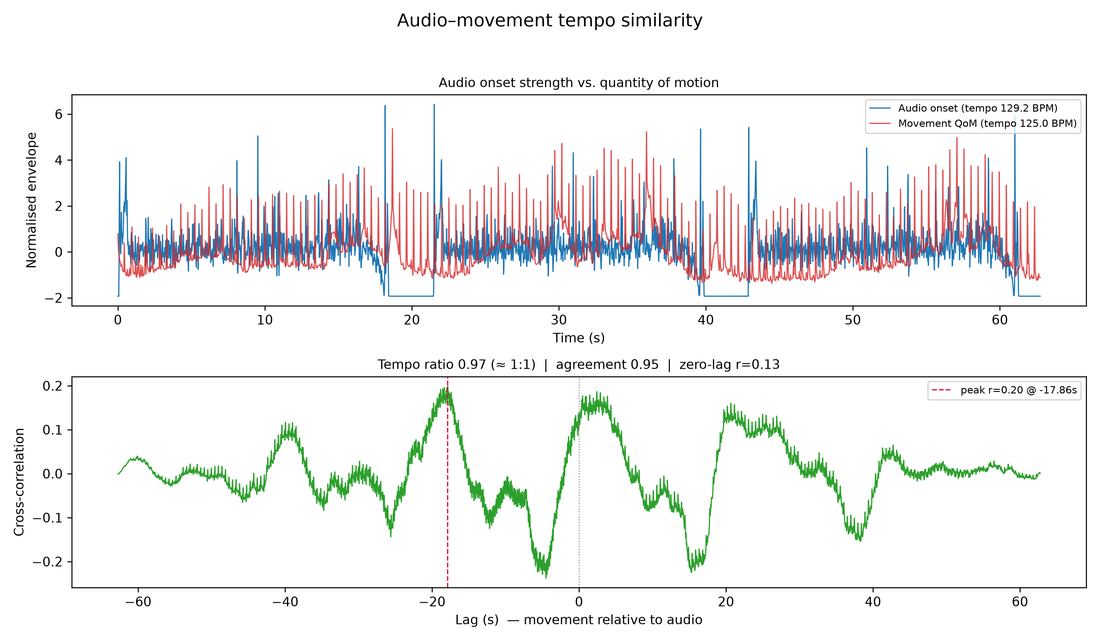 Top: audio onset strength vs. quantity of motion. Bottom: their cross-correlation, with the peak lag and tempo ratio annotated.
Phase synchrony
phase_synchrony() band-passes both the audio onset envelope and the quantity of motion to the tempo
band [fmin, fmax] Hz and compares their instantaneous phases (Hilbert transform). It reports the
phase-locking value (PLV, 0–1: how consistent the audio↔motion phase difference is) and draws
a polar histogram of the phase difference.
ps = mv.phase_synchrony(fmin=0.5, fmax=4.0)    # returns MgFigure
ps.show()
print(ps.data)                                 # PLV, mean phase difference, …
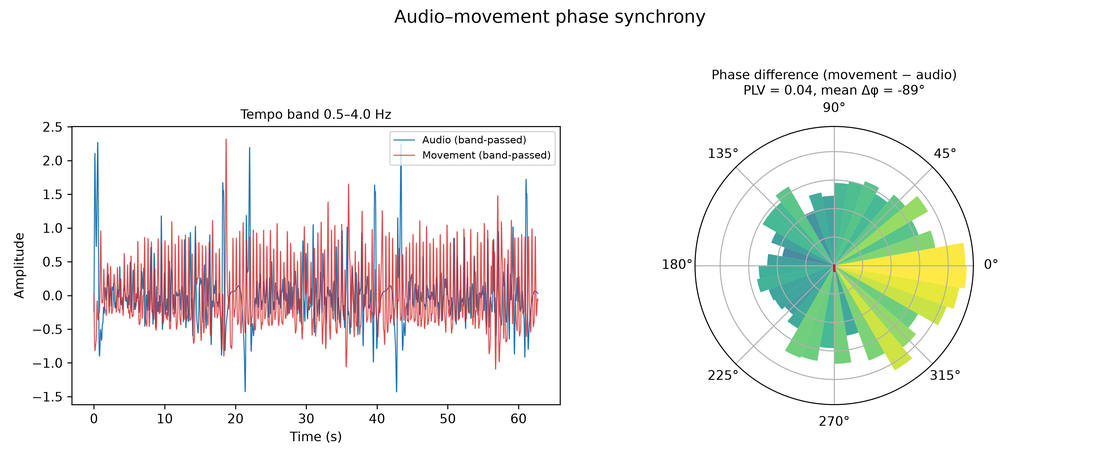 Left: the band-passed audio and motion signals. Right: a polar histogram of the phase difference with the PLV.
Structure comparison
structure_comparison() builds a self-similarity matrix (SSM) of the audio (from MFCC frames) and
of the video (from low-resolution frame appearance), resampled to the same number of time points,
and shows them side by side with their absolute difference map. Bright regions in the difference
are where the audio structure and the video structure diverge; it reports an overall
structural-agreement score.
sc = mv.structure_comparison(n=200, cmap='magma')   # returns MgFigure
sc.show()
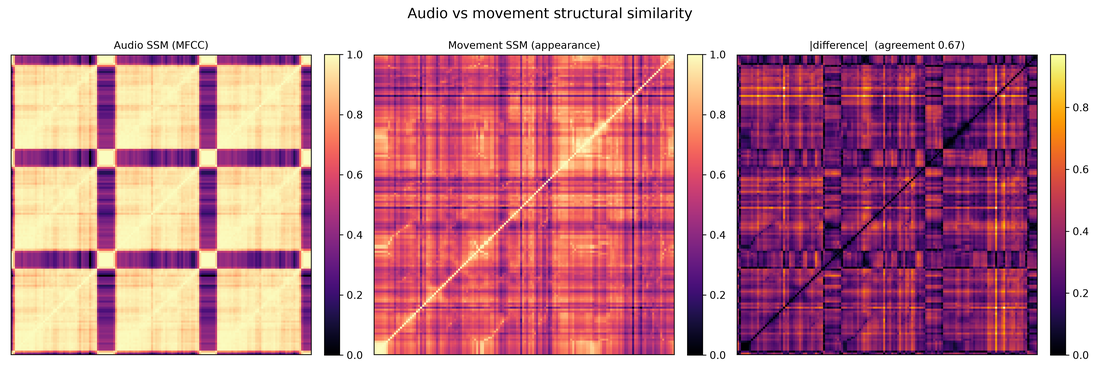 Audio SSM (MFCC) vs. video SSM (frame appearance) and their absolute difference.
Body–audio coupling
motion_audio_coupling() correlates each pose marker's speed with the audio onset envelope,
revealing which body parts are most rhythmically tied to the music. The figure shows a body map (the
average pose with markers coloured by correlation) plus a ranked bar chart, and a CSV of per-marker
correlations. It reuses cached pose keypoints or runs pose() first (pose kwargs forwarded).
bc = mv.motion_audio_coupling(cmap='coolwarm')   # returns MgFigure (+ CSV)
bc.show()
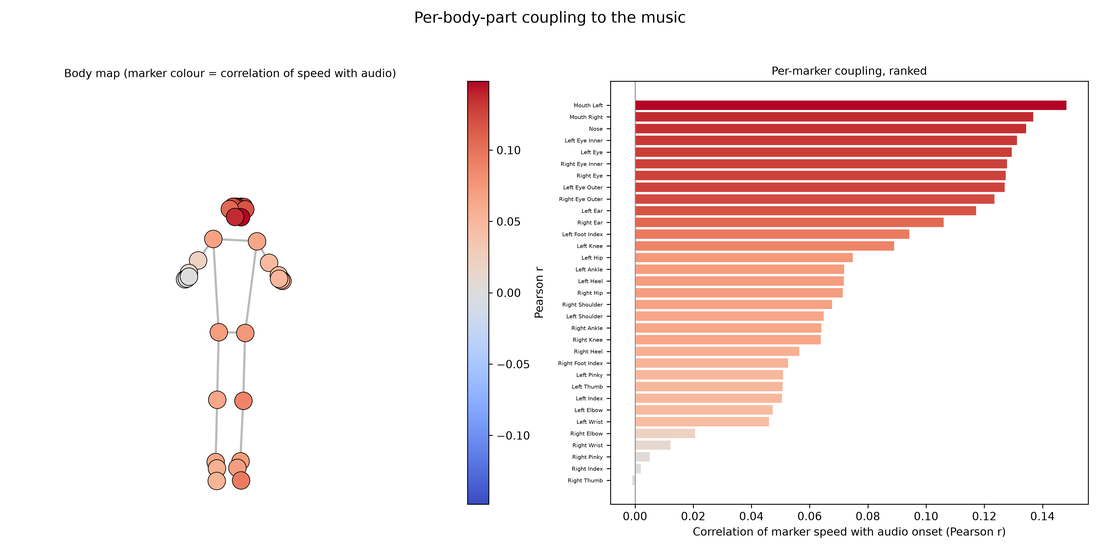 Each marker coloured by how strongly its speed correlates with the audio onset envelope, plus a ranked bar chart.
Dynamics coupling
dynamics_coupling() compares the audio RMS level with the quantity of motion (QoM). Does the
performer move more when the music is louder? It aligns the two envelopes and reports their
correlation at zero lag and at the best lag within max_lag seconds; the figure overlays the
normalised envelopes and shows an RMS-vs-motion scatter.
dc = mv.dynamics_coupling(max_lag=2.0)         # returns MgFigure
dc.show()
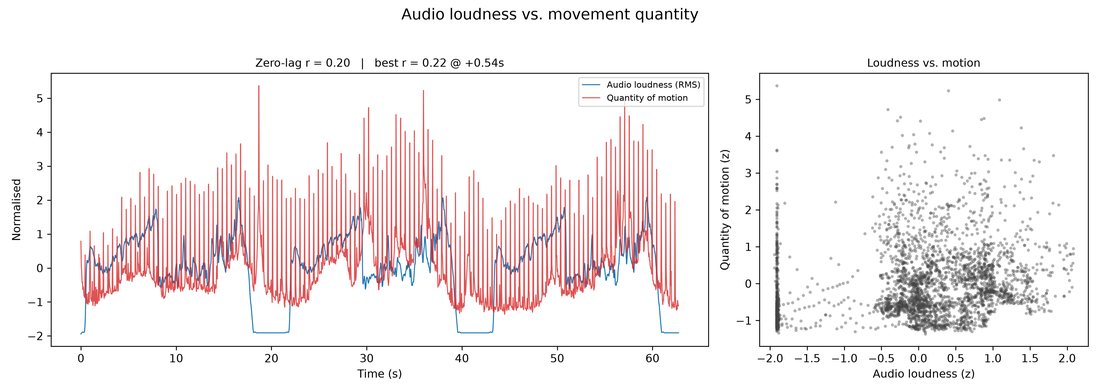 Audio RMS level overlaid on quantity of motion, with the RMS-vs-motion scatter and correlation.
Related, single-domain rhythm tools
These analyse rhythm within one domain but are natural companions to the comparisons above:
beat_statistics(source='motion')—circular timing statistics of the motion onsets (usesource='audio'for the audio track). See Audio Analysis.motiontempo()—dominant motion tempo (Hz/BPM) from the quantity-of-motion spectrum. See Video Analysis.tempogram()/tempo()—audio tempo and beat tracking. See Audio Analysis.