Video Analysis
All video analysis methods are called on an MgVideo object. Each method writes output files alongside the source video and returns a result object you can use directly or pass to further methods.
import musicalgestures as mg

mv = mg.MgVideo('/path/to/video.avi')
This page is a task reference: one snippet per method, with returns and gotchas. The course lives on the wiki and reads in order: chapter 4 walks through the video-based processes, chapter 5 shows in pictures what the threshold keeps and discards, and chapter 15 covers 360 video.
Choosing a method
Several methods have overlapping or similar-sounding names. This table disambiguates the most commonly confused pairs, one line each:
| Method | Use it when you want… |
|---|---|
average() |
a long-exposure mean of all frames—it is a convenience alias for blend(component_mode='average'). |
blend() |
to composite all frames with a chosen mode ('average', 'lighten', 'darken', …). |
history() |
a video where each frame carries a trail of overlaid past frames. |
motionhistory() |
a single Motion History Image—one image where brightness encodes when motion last happened (recency; order-dependent). |
motion().average() / heatmap() |
a single motion-density image—where and how much motion happened (order-independent). |
motiongrams() |
how motion (frame differences) is distributed in space over time. |
videograms() |
how the raw pixel intensity (the whole scene, not motion) is distributed in space over time. |
ssm() on MgVideo |
self-similarity from visual features (features='motiongrams'/'videograms'). |
ssm() on MgAudio |
self-similarity from audio features (features='spectrogram'/'chromagram'/'tempogram'). |
pose_waterfall() |
pose markers flowing through (x, time, y) space (needs pose data). |
silhouette_waterfall() |
the silhouette profile cascading over a time axis (no pose needed). |
motiontempo() |
the dominant motion tempo (from the quantity-of-motion signal). |
motiondescriptors() |
scalar summaries of how something moves: motion energy, smoothness (SPARC), entropy, and spectral descriptors. |
audio tempo() / tempogram() |
the audio tempo / rhythmic periodicity. |
tempo_similarity() |
to compare motion tempo against audio tempo. |
AVI conversion (convert)
Most methods stream frames through FFmpeg and run on any container, MP4 included. The OpenCV-decoded methods—flow.dense()/flow.sparse(), directograms(), impacts(), history_cv2()—first convert the input to an all-intra MJPEG .avi (cached as self.as_avi) for frame-accurate decoding; pass convert=False to skip that when your MP4 decodes reliably. pose() defaults to convert=None (auto): MediaPipe reads the source directly, the OpenPose backends convert. Outputs keep the source container.
mv = mg.MgVideo('clip.mp4')
mv.flow.dense(convert=False)
Threshold and filter parameters
Many methods accept threshold and filtertype:
threshold(float, 0–1): pixels with a change below this fraction of 255 are set to zero. The default is0.05. Higher values remove more background noise but may lose subtle motion.filtertype(str):'Regular'(default) thresholds and median-filters;'Binary'binarises the output;'Blob'applies erosion instead.
Worked visual examples are in chapter 5 of the wiki; exact semantics in the filter reference.
Motion analysis
motion() renders a motion video, both motiongrams, a motion plot, and a CSV of per-frame data in one call. It returns an MgVideo pointing to the motion video.
motion_video = mv.motion()          # returns MgVideo
motion_video.show()
mv.show(key='motion')               # equivalent shorthand

motion_vid = mv.motionvideo()       # motion video only
motiondata = mv.motiondata()        # CSV only (<name>_motion.csv)
motionplots = mv.motionplots()      # motion plot image (MgImage)
score = mv.motionscore()            # average VMAF motion score (float)
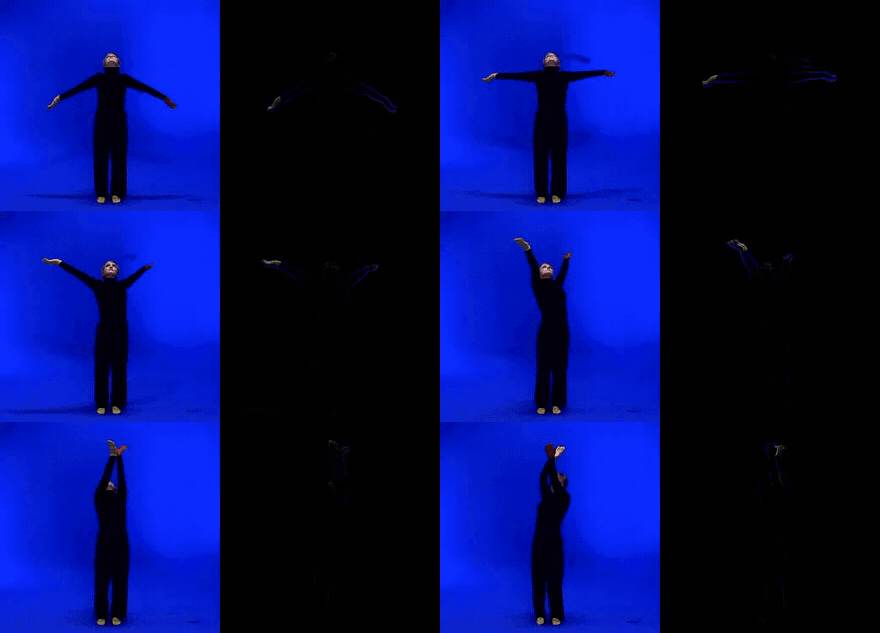 Input clip (left) and its motion video (right): only the pixels that change between frames remain.
The CSV contains one row per frame:
| Column | Description |
|---|---|
| Time | Frame timestamp in milliseconds |
| Qom | Quantity of motion (sum of active pixels) |
| ComX, ComY | Centroid of motion (normalised 0–1) |
| AomX1, AomY1, AomX2, AomY2 | Bounding box of motion area (normalised) |
On long recordings, restrict the work to what you will read: mv.motion(motion_analysis='qom', save_motiongrams=False) is roughly 4x faster than the defaults.
Motiongrams
motiongrams = mv.motiongrams()        # returns MgList[MgImage, MgImage]
motiongrams[0].show()                 # x-motiongram (…_mgv.png)
motiongrams[1].show()                 # y-motiongram (…_mgh.png)
motiongrams.show(key='horizontal')    # select a panel by orientation
mv.show(key='vertical')               # shorthand from the source MgVideo
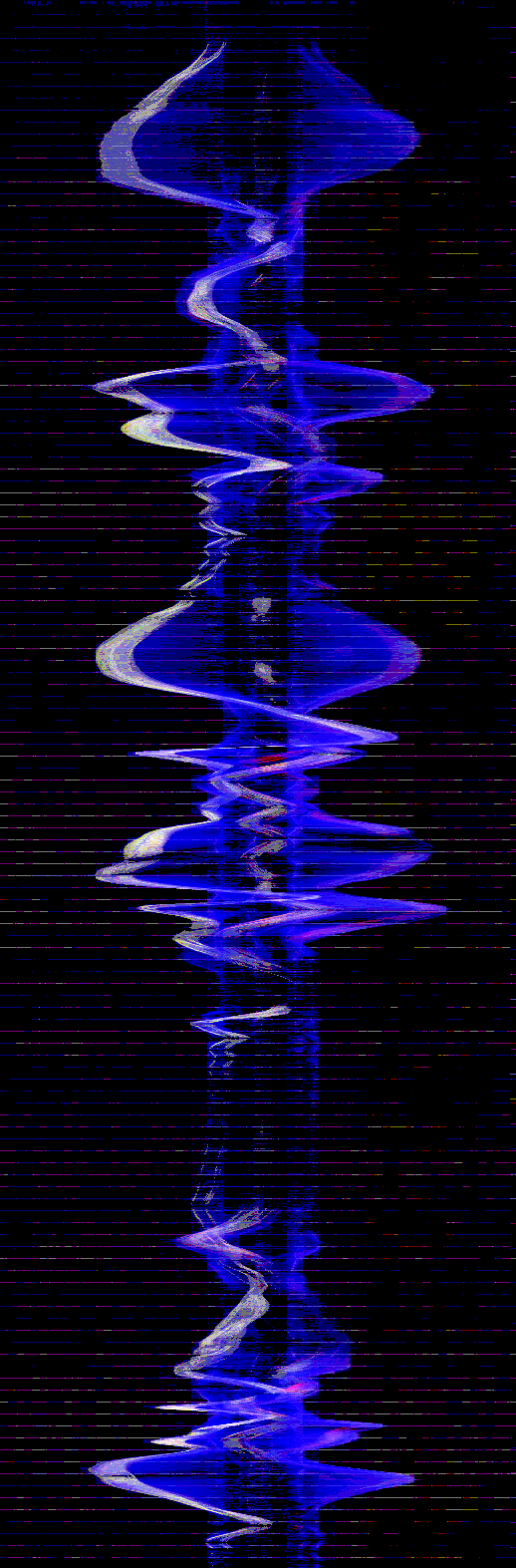 x-motiongram: horizontal motion collapsed onto the x-axis, stacked top→bottom over time.
Motion heatmap
heatmap() accumulates the absolute frame-to-frame difference into a single colour-mapped image (returns MgImage). By default the heat is overlaid on a dimmed average frame; overlay=False gives the bare heatmap. colormap takes any matplotlib colormap ('inferno' default), blur smooths, gamma (<1) boosts faint motion, and normalize scales the most active pixel to the top of the colormap.
heat = mv.heatmap()
heat = mv.heatmap(blur=3, gamma=0.4, colormap='viridis', overlay=False)
heat.show()
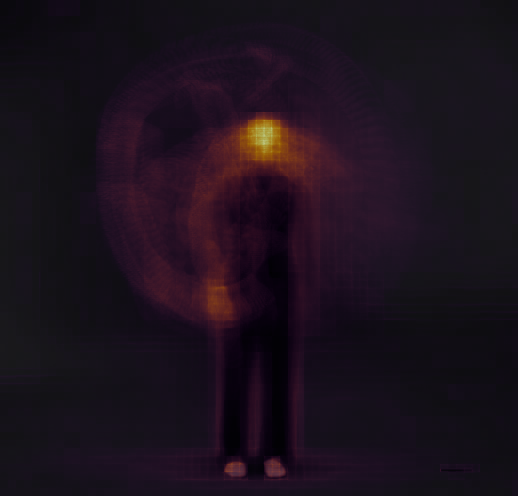 Heatmap: accumulated frame-to-frame difference on the dimmed average frame.
Space-time visualisations
Silhouettes are extracted with MediaPipe selfie segmentation when available, else by background subtraction against the average frame (method='auto'|'mediapipe'|'bgsub'; best on static-camera recordings). For cleaner silhouettes raise threshold, tune kernel_size, and set keep_largest=True.
mv.multishot(n_bodies=6).show()      # chronophotography (MgImage); stroboscope() is a deprecated alias
mv.silhouette_waterfall(n_samples=40, axis='horizontal').show()   # MgFigure; axes=False for a clean render
mv.spacetime_volume(n_samples=50).show()                          # 3D (x, y, t) point cloud (MgFigure)
mv.motionhistory().show()            # Motion History Image (MgImage); no silhouette needed
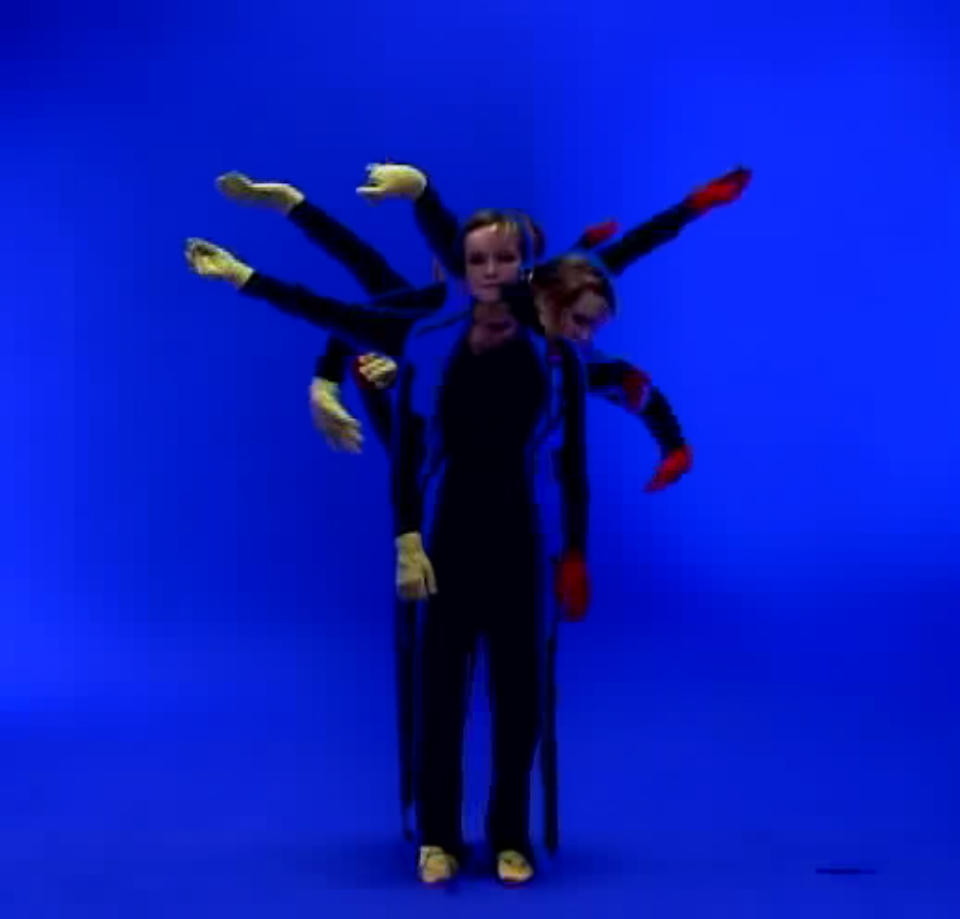 Multishot: several moments of the recording composited into one picture.
motionhistory() encodes recency (order-dependent), while heatmap()/motion().average() encode density (order-independent). Its decay sets trail length as a fraction of the clip; normalize defaults to False because normalising over-brightens residual trails on clips that end in stillness. Chapter 4 of the wiki works through the density-against-recency distinction.
Motion tempo
motiontempo() estimates the dominant motion tempo from the quantity-of-motion signal via an FFT, in Hz and BPM (returns MgFigure). Restrict the search band with fmin/fmax (Hz).
mt = mv.motiontempo()
print(mt.data['tempo_bpm'], mt.data['dominant_frequency'])
mt.show()
Motion descriptors
motiondescriptors() returns an MgFigure of scalar motion descriptors computed from the QoM signal, also written to _motiondescriptors.csv:
| descriptor | meaning |
|---|---|
motion_energy |
mean squared QoM—the overall amount of motion. |
motion_smoothness |
SPARC (spectral arc length); non-positive, less negative = smoother. |
motion_entropy |
normalised (0–1) Shannon entropy of the QoM distribution. |
dominant_freq |
the dominant periodicity of the motion (Hz). |
spectral_centroid |
the centre of mass (Hz) of the motion spectrum. |
md = mv.motiondescriptors()
print(md.data['motion_smoothness'], md.data['motion_entropy'])
md.show()
The spectral descriptors use a Hann window (window='none' for rectangular) and search a motion band (fmin/fmax, default 0.2–10 Hz) so slow drift near 0 Hz does not masquerade as the dominant motion periodicity.
Motion vectors
motionvectors() draws the motion vectors carried by inter-frame codecs via FFmpeg's codecview filter (returns MgVideo); motionvectordata() reads the same vectors as numbers, and motionvectoroverview() renders every vector view on one sheet from a single decode.
mvecs = mv.motionvectors()
mvecs.show()
Note
Only H.264 and MPEG-4 Part 2 export vectors. HEVC, VP9, and intra-only formats (e.g. MJPEG .avi) return none; convert to H.264 first. Reading vectors as data needs pip install musicalgestures[motionvectors].
Eulerian Video Magnification
eulerian() amplifies subtle changes (returns MgVideo). mode='color' targets colour changes such as pulse or breathing; mode='motion' targets small movements. freq_low/freq_high set the temporal band in Hz, amplification the gain, levels the pyramid depth.
evm = mv.eulerian(mode='color', freq_low=0.83, freq_high=1.0, amplification=50)
evm = mv.eulerian(mode='motion', freq_low=0.4, freq_high=3.0, amplification=20)
evm.show()
Sonomotiongram
sonomotiongram() treats the motiongram as a magnitude spectrogram and resynthesises it to audio via an inverse STFT (Griffin–Lim). It returns an MgAudio; the rendered WAV is at .filename.
son = mv.sonomotiongram(sonogram='vertical')   # or 'horizontal'
son.spectrogram().show()
Videograms
Videograms apply the motiongram collapsing to the source frames directly, showing the full scene content over time rather than motion only (returns MgList[MgImage, MgImage]).
videograms = mv.videograms()
videograms.show(key='horizontal')
Self-Similarity Matrix (SSM)
ssm() compares each column or row of a motiongram or videogram against all others, revealing periodic structure. combine=True folds both axes of motion into a single MgImage; otherwise an MgList of two matrices is returned.
motionssm = mv.ssm(features='motiongrams', cmap='viridis', norm=2)
combined = mv.ssm(features='motiongrams', combine=True)
combined.show()
videossm = mv.ssm(features='videograms')
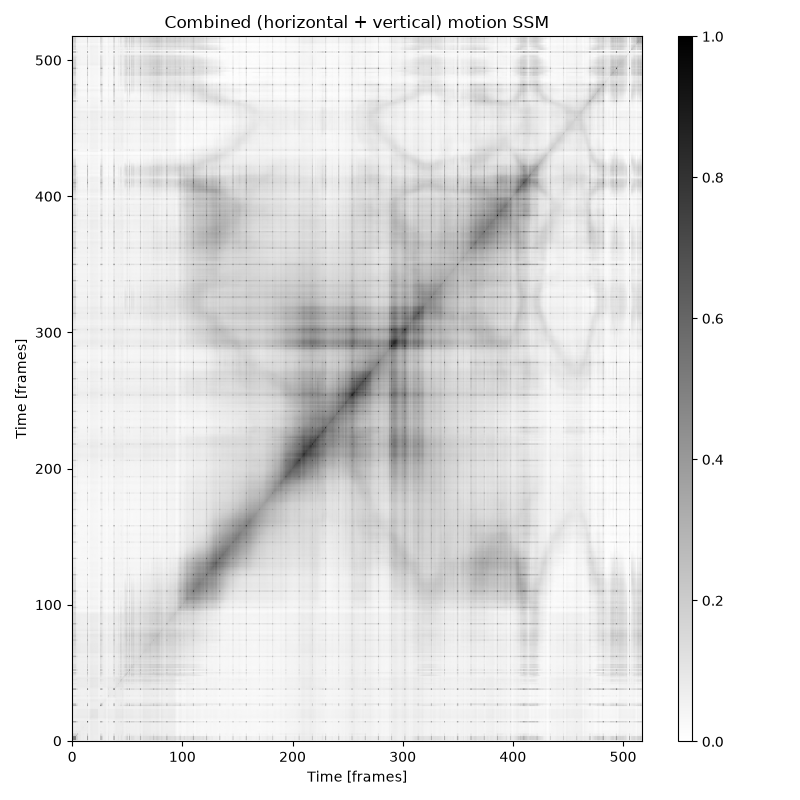 Combined motion SSM: both axes of motion in a single matrix.
Background subtraction
subtract() removes a static background from each frame (returns MgVideo). With no background image it computes the frame average automatically; mg.MgVideo(...).plate() renders the empty room as a median instead.
subtraction = mv.subtract()
subtraction = mv.subtract(bg_img='/path/to/background.png', curves=0.3)
subtraction.show()
Grid preview
grid() assembles evenly-spaced frames into a single image (returns MgImage; return_array=True gives a NumPy array).
grid = mv.grid(height=300, rows=3, columns=3)
grid.show()
History video
history() overlays the last history_length frames onto each frame (returns MgVideo). Applied to a motion video it emphasises motion traces.
history = mv.history(history_length=20)
motionhistory = mv.motionvideo().history()
mv.show(key='motionhistory')
Blend
blend() composites all frames into a single image (returns MgImage); average() is the component_mode='average' alias. A blend of a motion video shows where motion was concentrated.
average = mv.average()
lighten = mv.blend(component_mode='lighten')
motion_average = mv.motionvideo().blend(component_mode='average')
Pose estimation
pose() runs skeleton estimation on each frame (returns MgVideo). The full tutorial is on the Pose Tracking page and in chapter 10 of the wiki; complete signatures in the pose reference.
pose = mv.pose()                                # MediaPipe (default): 33 landmarks, fast on CPU
pose = mv.pose(model='coco', device='cpu', downsampling_factor=4)   # OpenPose, multi-person
pose = mv.pose(style='markers', overlay=False, background='white')  # print-friendly render
pose = mv.pose(marker_history=10)               # motion trail behind each marker
pose.show()
Key parameters: model ('mediapipe' default; 'body_25'/'coco'/'mpi' need ~200 MB Caffe downloads and are slow without CUDA), style ('both'/'markers'/'skeleton'), overlay, background ('black'/'white'), device ('cpu'/'gpu'; OpenPose without CUDA falls back), threshold (keypoint confidence, 0–1), data_format ('csv'/'tsv'/'txt'/'c3d', combinable), and use_cache (re-render a different style without re-running inference). Two summary images are attached to the result—pv.average_pose and pv.trajectories—plus a per-marker stats CSV; trajectory_background ('black'/'white'/'transparent') and trajectory_labels=True control the trajectories render.
Derived pose plots reuse cached keypoints (or run pose() first, forwarding pose kwargs):
mv.pose_waterfall(style='skeleton', n_samples=60).show()   # (x, time, y) waterfall (MgFigure)
mv.pose_segments(n_bins=24).show()      # per-segment circular (rose) statistics + CSV
mv.pose_center().show()                 # centre on the global centroid (mccenter port)
mv.pose_distance().show()               # cumulative distance travelled per marker (mccumdist port)
GPU acceleration
pose(model='mediapipe', device='gpu') works with the standard pip OpenCV. The OpenCV-based methods (flow.dense(use_gpu=True), blur_faces(use_gpu=True), OpenPose device='gpu') need OpenCV built with CUDA; check with mg.cuda_build_available().
Audio–motion analysis
Reports comparing a performer's sound with their movement have their own page: Audio-Video Processing & Analysis.
mv.tempo_similarity().show()      # audio tempo vs motion tempo
mv.phase_synchrony().show()       # phase-locking value (PLV)
mv.structure_comparison().show()  # audio SSM vs video SSM + difference
mv.motion_audio_coupling().show()   # which body parts track the music
mv.dynamics_coupling().show()     # audio RMS level vs quantity of motion
Optical flow
Sparse flow tracks salient feature points; dense flow estimates motion at every pixel, hue coding direction. Both return MgVideo. velocity=True on dense flow returns an MgFigure with per-frame speed instead (distance/angle_of_view calibrate to metres).
mv.flow.sparse().show()
mv.flow.dense(use_gpu=True).show()          # CUDA with CPU fallback
velocity = mv.flow.dense(velocity=True)
xvel = velocity.data['xvel']
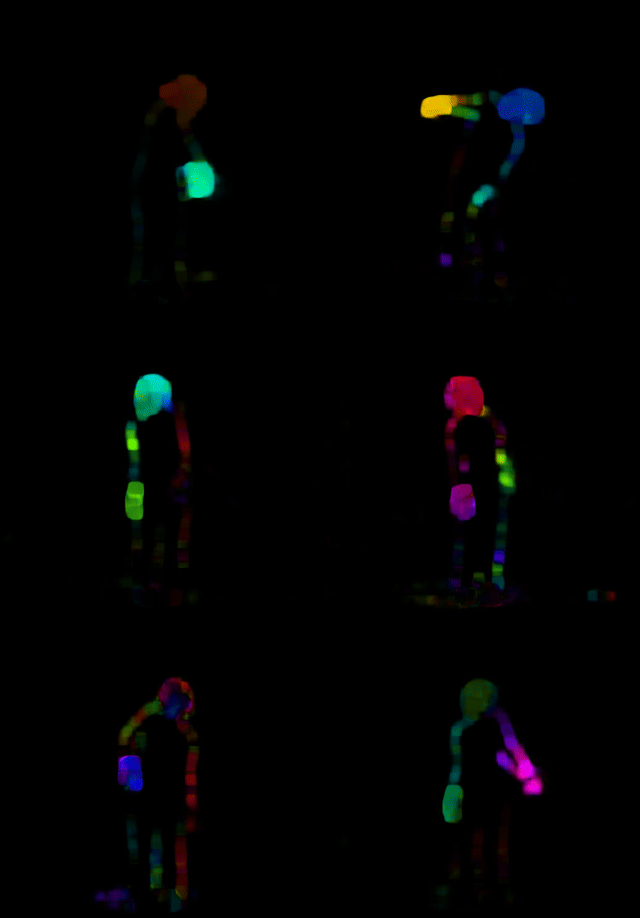 Dense optical flow: hue encodes direction, brightness encodes speed.
Face anonymisation
blur_faces() detects faces in every frame and applies a blur, black rectangle, or image mask (returns MgVideo). draw_heatmap=True renders a heatmap of detection centroids instead.
blur = mv.blur_faces(save_data=True, data_format='csv')
mv.blur_faces(mask='image', mask_image='/path/to/mask.jpg')
heatmap = mv.blur_faces(draw_heatmap=True, neighbours=128, resolution=500, save_data=False)
Warp audio–motion beats
warp_audiomotion_beats() aligns the motion beats (Davis's visual beats, from directograms) with audio beats to create a re-timed video (returns MgVideo). Its building blocks are available directly: directograms() factors motion magnitude into angular bins over time, like a spectrogram with angles replacing frequencies, and impacts() derives visual onset envelopes from directogram deceleration. Both return MgFigure.
warp = mv.warp_audiomotion_beats('/path/to/audio.wav')
directograms = mv.directograms()    # data in .data['directogram']
impacts = mv.impacts(detection=True, local_mean=0.1, local_maxima=0.15)
360 video: anglegram and AEM overlay
Mg360Video adds directional analyses for equirectangular 360 video; the projection is auto-detected. The anglegram is a time × azimuth heat map of visual motion, and aem_overlay() draws an Audio Energy Map (a time/azimuth/energy CSV/TSV, e.g. from ambiscape) over it or on the video. Chapter 15 of the wiki is the full walkthrough.
v = mg.Mg360Video('walkaround.mp4')
ag = v.anglegram()                           # MgFigure; .data['anglegram'], .data['azimuth']
v.aem_overlay('aem.tsv', on='anglegram')     # audio energy in colour over the anglegram
v.aem_overlay('aem.tsv', on='video')         # translucent heat strip on the video
front = v.view(yaw=0, h_fov=90, v_fov=60)    # rectilinear crop as a regular MgVideo
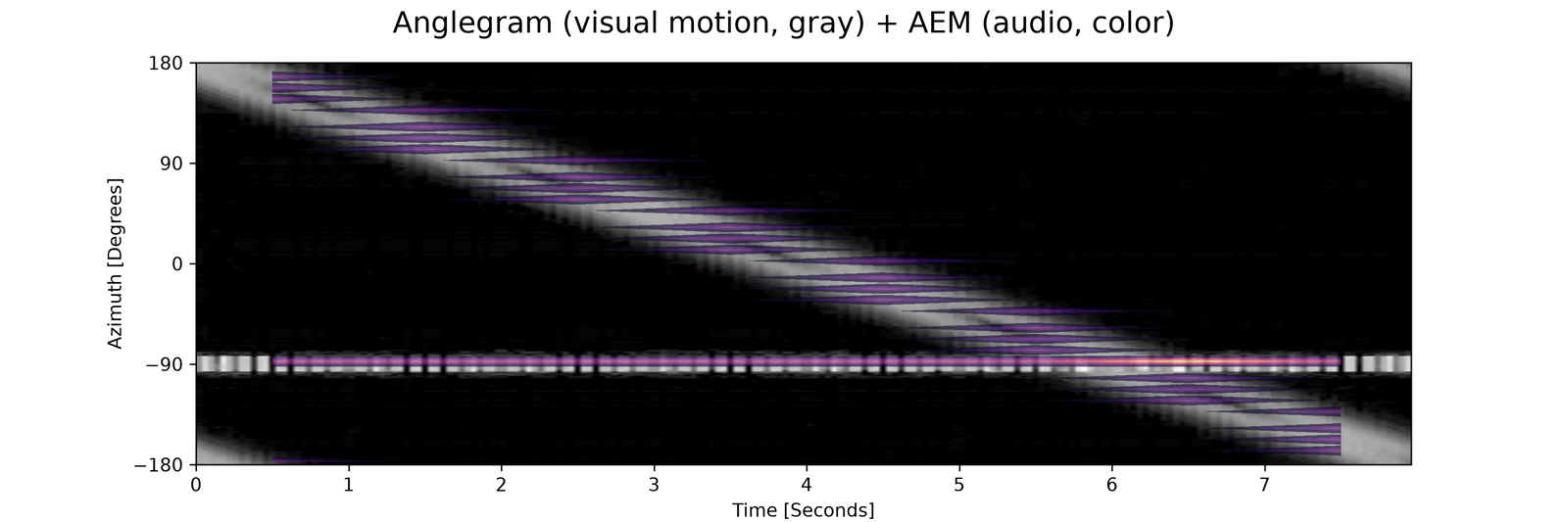 Visual motion in grey, audio energy in colour, on shared time and azimuth axes.
The anglegram's azimuth axis defaults to the ambisonic convention (+90° = left), matching ambiscape's audio anglegram; pass azimuth_convention='image' to follow image x instead.
Further
Course chapters on the wiki:
- Chapter 4: Video-based Processes
- Chapter 5: The Effects of Filtering
- Chapter 10: Pose and Motion Capture
- Chapter 15: 360 Video Anglegrams and AEM
API reference: