This chapter works at the model layer of the five layers. In text and images the interface is where most of the interesting decisions live, because the model will usually give you something usable and the craft is in steering it. Video is different. Here the model itself is the constraint. Almost every practical rule in this chapter (how long a clip can be, why it drifts, why the last frame matters) follows from a property of the machinery rather than from a design choice in the tool.
Video arrived late, and the delay is informative. Text and images reached the public in 2022, and the first credible text-to-video systems came in 2024. By 2026 they make short cinematic clips, advertising inserts, music videos, and documentary B-roll that survive a broadcast pipeline. B-roll is the supporting footage cut in around the main shot, such as a street, a landscape, or a pair of hands at work. They still do not make sustained narrative film, and the reason is time rather than a missing feature.
The aim of this chapter is to give you an accurate account of what happens along the time axis. Then, when a clip falls apart, you can say where it fell apart and why, and you can plan three shots that cut together rather than three clips that each looked good alone.
Why video is hard
A video is a sequence of frames, and generating a sequence of frames that are consistent over time (the same character, the same lighting, the same physics) is dramatically harder than generating any single frame. Three problems compound.
Cost. Five seconds at 30 frames per second is 150 frames. Even in the compressed latent space that chapter 5 introduced, that is roughly two orders of magnitude more work than a single image, and the attention that ties the frames together grows faster still. Everything about how video tools are priced, rationed, and queued follows from this one fact.
Source
import numpy as np

import matplotlib.pyplot as plt
plt.rcParams.update({
    "font.size": 10,
    "axes.titlesize": 11,
    "axes.labelsize": 10,
    "xtick.labelsize": 9,
    "ytick.labelsize": 9,
    "legend.fontsize": 9,
    "figure.figsize": (10, 4),
    "figure.dpi": 100,
    "savefig.dpi": 150,
    "axes.spines.top": False,
    "axes.spines.right": False,
})

navy, purple, rose = "#1f2545", "#5a2a7a", "#e8556d"

seconds = np.arange(1, 21)
frames = 30 * seconds
pairs = frames * (frames - 1) / 2

fig, ax = plt.subplots(figsize=(10, 3.8))
ax.plot(seconds, frames, color=purple, lw=2.6, marker="o", markersize=4,
        label="frames to generate")
ax.plot(seconds, pairs, color=rose, lw=2.6, marker="o", markersize=4,
        label="pairs of frames that have to agree")

for value, colour, offset in ((frames[4], purple, 1.6), (pairs[4], rose, 1.6)):
    ax.plot(5, value, "o", color=colour, markersize=9)
    ax.text(5.4, value * offset, f"{int(value):,}".replace(",", " "),
            fontsize=10, color=colour, fontweight="bold")
ax.axvline(5, color="#b9b4c4", lw=1.2, ls="--")
ax.text(5.0, 40, "a five-second clip", ha="center", va="top", fontsize=10,
        color="#444444")

ax.set_yscale("log")
ax.set_ylim(20, 3e5)
ax.set_xlim(1, 20)
ax.set_xticks([1, 5, 10, 15, 20])
ax.set_xlabel("length of the clip in seconds, at 30 frames a second")
ax.set_ylabel("count (logarithmic scale)")
ax.legend(loc="lower right", frameon=False)
ax.grid(color="#dcd7e4", lw=0.8, ls=":")
ax.set_axisbelow(True)
for side in ("right", "top"):
    ax.spines[side].set_visible(False)

plt.tight_layout()
plt.show()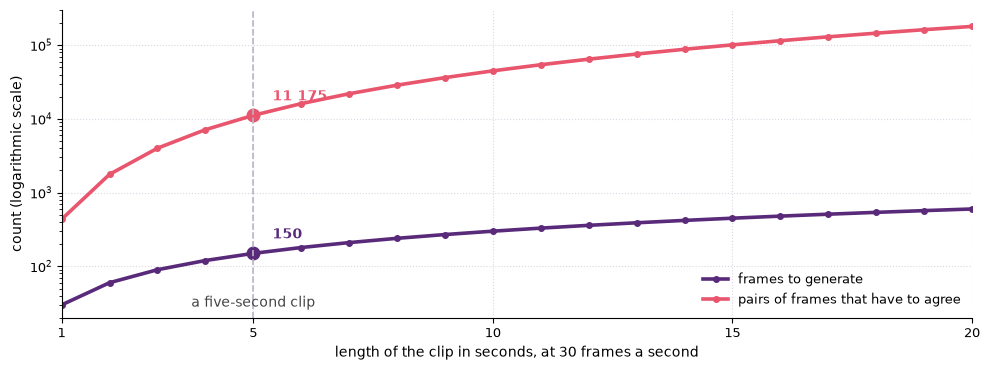
Figure: The frames in a clip grow with its length, and the pairs of frames that have to agree grow with the square of it, which is where the cost of video sits.
Consistency. Each frame has to agree with the frames around it. A jacket cannot change colour halfway through, a face cannot subtly become a different face, and a shadow cannot swap sides. That requires the model to carry information across the sequence rather than to solve each frame on its own, which is why coherence degrades as clips get longer.
Physics. Cloth has to fall, water has to flow, a hand has to close around a cup and stay closed. An image model can fake plausible physics in a single frame, because a still only has to look right once. A video model has to fake a trajectory, and a trajectory has many more ways of being wrong.
There is a perceptual reason these failures are so easy to spot. People are unusually sensitive to the movement of bodies and faces, and a trajectory that is slightly wrong reads as wrong long before anyone can say what changed. A still image is judged by what it shows, and a clip is judged by whether its movement is believable.
Source
from matplotlib.patches import Rectangle

import matplotlib.pyplot as plt
plt.rcParams.update({
    "font.size": 10,
    "axes.titlesize": 11,
    "axes.labelsize": 10,
    "xtick.labelsize": 9,
    "ytick.labelsize": 9,
    "legend.fontsize": 9,
    "figure.figsize": (10, 4),
    "figure.dpi": 100,
    "savefig.dpi": 150,
    "axes.spines.top": False,
    "axes.spines.right": False,
})

navy, purple, rose = "#1f2545", "#5a2a7a", "#e8556d"

fig, ax = plt.subplots(figsize=(10, 3.6))
labels = ["frame t", "t+1", "t+2", "t+3", "t+4"]
heights = [2.55, 2.75, 2.9, 2.75, 2.55]

for i, (label, height) in enumerate(zip(labels, heights)):
    x = 0.4 + i * 2.3
    ax.add_patch(Rectangle((x, 2.0), 1.7, 1.3, facecolor="#f4f1fa",
                           edgecolor=purple, linewidth=1.8))
    ax.plot(x + 0.4 + i * 0.2, height, "o", markersize=11, color=navy)
    ax.text(x + 0.85, 1.8, label, ha="center", va="top", fontsize=11, color=navy)
    if i < len(labels) - 1:
        ax.annotate("", xy=(x + 2.3, 2.65), xytext=(x + 1.7, 2.65),
                    arrowprops=dict(arrowstyle="-|>", color=rose, lw=1.8))

ax.text(6.0, 1.05, "temporal consistency between frames",
        ha="center", fontsize=11, color=rose)
ax.text(6.0, 0.45, "time →", ha="center", fontsize=11, color=navy)

ax.set_xlim(0, 12)
ax.set_ylim(0.1, 3.8)
ax.axis("off")
plt.tight_layout()
plt.show()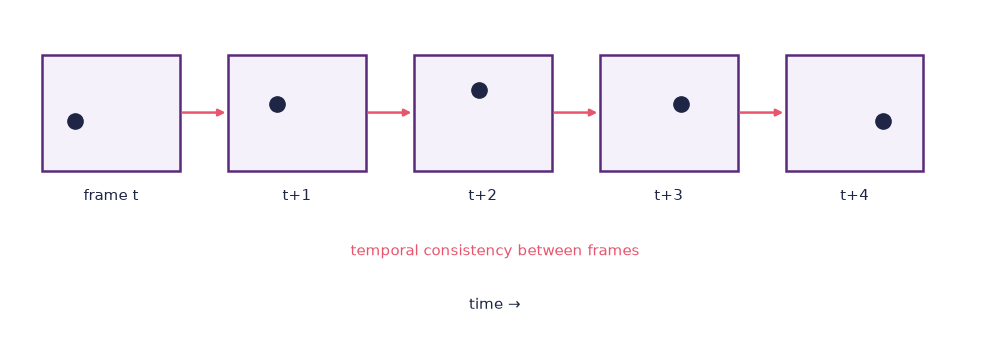
Figure: A stack of frames along a time axis, with arrows marking the consistency each frame owes the ones around it, because the hard part of video is not the frames but the time axis between them.
Three strategies address the time axis, and it is worth knowing them by name because the failure modes you meet are strategy-specific.
- Frame-by-frame with attention across frames. Frames are generated in sequence, and each one attends to the others so that it can see what has already been drawn. This is comparatively cheap, and it drifts, because small errors accumulate in the direction of travel.
- Space-time diffusion. The whole clip is treated as one tensor, meaning a single block of numbers, with two spatial dimensions and one temporal one, and the entire block is denoised at once. Conceptually clean, globally consistent, and expensive enough that clip length is capped hard.
- Two-stage keyframe and interpolation. A first model generates a small number of keyframes, and a second lighter model fills in the frames between them. This buys length cheaply, and it produces the characteristic failure where the keyframes are excellent and the motion between them slides.
Source
from matplotlib.patches import FancyBboxPatch, Rectangle

import matplotlib.pyplot as plt
plt.rcParams.update({
    "font.size": 10,
    "axes.titlesize": 11,
    "axes.labelsize": 10,
    "xtick.labelsize": 9,
    "ytick.labelsize": 9,
    "legend.fontsize": 9,
    "figure.figsize": (10, 4),
    "figure.dpi": 100,
    "savefig.dpi": 150,
    "axes.spines.top": False,
    "axes.spines.right": False,
})

navy, purple, rose = "#1f2545", "#5a2a7a", "#e8556d"

fig, ax = plt.subplots(figsize=(10, 5))
rows = [
    (4.5, "Frame by frame, with attention across frames",
     "cheap, and it drifts in the direction of travel"),
    (2.6, "Space-time diffusion",
     "consistent throughout, and the clip length is capped hard"),
    (0.7, "Keyframes, then interpolation",
     "long and cheap, and the motion between the keyframes slides"),
]

for index, (base, heading, note) in enumerate(rows):
    ax.text(0.3, base + 1.05, heading, fontsize=11, fontweight="bold", color=navy)
    for i in range(5):
        x = 0.3 + i * 1.1
        if index == 2:
            keyframe = i in (0, 3)
            face = "#fff0f3" if keyframe else "white"
            edge = rose if keyframe else "#b9b4c4"
            style = "-" if keyframe else "--"
        else:
            face, edge, style = "#f4f1fa", purple, "-"
        ax.add_patch(Rectangle((x, base), 0.85, 0.8, facecolor=face,
                               edgecolor=edge, linewidth=1.6, linestyle=style))
        if index == 0 and i < 4:
            ax.annotate("", xy=(x + 1.1, base + 0.4), xytext=(x + 0.85, base + 0.4),
                        arrowprops=dict(arrowstyle="-|>", color=navy, lw=1.4))
    if index == 1:
        ax.add_patch(FancyBboxPatch((0.15, base - 0.15), 5.55, 1.1,
                                    boxstyle="round,pad=0.02,rounding_size=0.12",
                                    facecolor="none", edgecolor=rose,
                                    linewidth=1.8, linestyle="--"))
    ax.text(5.9, base + 0.4, note, va="center", fontsize=10, color=navy)

ax.text(0.3, 6.2, "Three ways to handle the time axis, and what each one gets wrong",
        fontsize=11, fontweight="bold", color=purple)

ax.set_xlim(0, 12)
ax.set_ylim(0.2, 6.7)
ax.axis("off")
plt.tight_layout()
plt.show()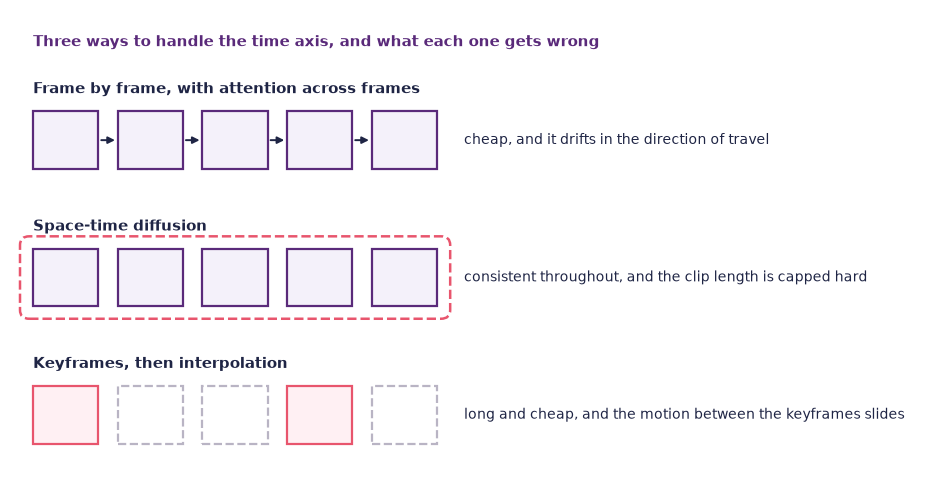
Figure: Each of the three strategies for the time axis buys something and fails in its own way, which is why the failures are worth recognising by name.
By 2026 the strongest public systems combine all three, which is why their outputs fail in mixed ways rather than in one recognisable way.
What current video models can do
The list below is a snapshot of early 2026 and will date faster than most of this book. Read it as a description of the shape of the capability rather than as a specification.
Mainstream text-to-video and image-to-video services reliably produce:
- clips of roughly five to fifteen seconds at high definition, sometimes longer at reduced quality;
- photorealistic or stylised output, selected by prompt in the same way as an image model;
- camera motion under instruction, including orbit, dolly, push, pull, and hand-held;
- image-to-video, which takes a still you already have and animates it;
- keyframe-to-keyframe, where you supply a first and a last frame and the model invents the motion between them;
- lip-sync, driving a static face with an audio file;
- style transfer across an existing clip, restyling footage you shot yourself.
They struggle with:
- length, where coherence falls away somewhere past ten or twenty seconds in most systems;
- specific people and protected characters, which most commercial services refuse outright rather than fail at;
- crowds and interaction, where two people holding a conversation is at the edge of what is reliable;
- hands, small objects, and printed text, which are the image failures from chapter 5 with a time axis added to them;
- counting and continuity, so that the number of people in a shot can change while the shot is running.
The pattern is the same one as for images. These models are excellent at texture and plausibility and weak at discrete structure, and adding time gives the weakness more room to show. If your shot depends on something being the same from second one to second eight, plan to check it.
Two consequences matter for how you work. The first is that the honest unit of video AI in 2026 is the shot, not the scene and certainly not the film, because almost every system generates a single continuous take. The second is that image-to-video is usually the better route than text-to-video, for exactly the reason that a reference image beat a longer prompt in chapter 5. A still you have already judged removes an entire category of uncertainty before the expensive part begins.
The vocabulary of video prompting
Video prompts are richer than image prompts because they have to describe change as well as appearance. A working template:
[Subject + key features],
[scene / setting],
[camera angle and movement],
[lighting and time of day],
[style],
[motion within the scene]
A worked example:
A young woman walking quickly along the riverbank in Oslo,
autumn leaves on the ground, river to the left,
medium-wide shot from a hand-held camera following her from behind,
overcast late-afternoon light,
documentary style,
she pulls a beanie out of her pocket and puts it on as she walks
Four concepts do most of the work.
Camera moves. The vocabulary is borrowed straight from film, and the models were trained on footage that came with those words attached, so using them properly pays. Dolly in, truck left, crane up, orbit, push in, static. A named move is understood far more reliably than a description of the same move in ordinary language.
Motion, spelled out in time. Do not assume that “looking sad” will produce someone beginning to cry. State what moves, in what order, and roughly how fast. This is the single largest difference from image prompting, and the most common reason a clip comes back with a beautiful subject standing perfectly still.
Cuts, which you do not get. Most systems in 2026 generate one continuous shot, so a request for a cut inside a prompt is either ignored or answered with a bewildering camera lurch. Multi-shot sequences are assembled afterwards in an editor, which means the edit is yours and always was.
Source
import numpy as np

import matplotlib.pyplot as plt
plt.rcParams.update({
    "font.size": 10,
    "axes.titlesize": 11,
    "axes.labelsize": 10,
    "xtick.labelsize": 9,
    "ytick.labelsize": 9,
    "legend.fontsize": 9,
    "figure.figsize": (10, 4),
    "figure.dpi": 100,
    "savefig.dpi": 150,
    "axes.spines.top": False,
    "axes.spines.right": False,
})

navy, purple, rose = "#1f2545", "#5a2a7a", "#e8556d"
rng = np.random.default_rng(12)

count, height, width = 60, 36, 48
cut = 34
ys, xs = np.mgrid[0:height, 0:width]
clip = np.zeros((count, height, width))

for index in range(count):
    if index < cut:
        base = 0.12 + 0.16 * ys / height
        centre = 10 + 0.75 * index
        blob = 0.85 * np.exp(-(((xs - centre) / 5.0) ** 2 + ((ys - 20) / 5.0) ** 2))
    else:
        base = 0.92 - 0.22 * ys / height
        centre = 38 - 0.55 * (index - cut)
        blob = -0.75 * np.exp(-(((xs - centre) / 4.0) ** 2 + ((ys - 12) / 4.0) ** 2))
    clip[index] = np.clip(base + blob + rng.normal(0, 0.012, (height, width)), 0, 1)

difference = np.abs(np.diff(clip, axis=0)).mean(axis=(1, 2))

fig = plt.figure(figsize=(10, 4.6), layout="constrained")
grid = fig.add_gridspec(2, 8, height_ratios=[1, 1.6])
samples = [0, 10, 20, 30, 34, 40, 50, 59]
for column, index in enumerate(samples):
    ax = fig.add_subplot(grid[0, column])
    ax.imshow(clip[index], cmap="bone", vmin=0, vmax=1)
    ax.set_xticks([])
    ax.set_yticks([])
    ax.set_title(f"frame {index}",
                 color=rose if index >= cut else navy)
    for side in ax.spines.values():
        side.set_visible(True)
        side.set_color(rose if index >= cut else "#cfc7dd")

curve = fig.add_subplot(grid[1, :])
curve.plot(np.arange(1, count), difference, color=purple, lw=2.2)
curve.axvline(cut, color=rose, lw=1.6, ls="--")
curve.annotate("the cut", xy=(cut, difference[cut - 1]), xytext=(cut + 6, difference.max() * 0.78),
               fontsize=11, color=rose,
               arrowprops=dict(arrowstyle="-|>", color=rose, lw=1.4))
curve.text(4, difference.max() * 0.30, "steady movement inside one shot",
           fontsize=10, color="#444444")
curve.set_xlabel("frame")
curve.set_ylabel("average change\nfrom the frame before")
curve.set_xlim(1, count - 1)
for side in ("right", "top"):
    curve.spines[side].set_visible(False)

plt.show()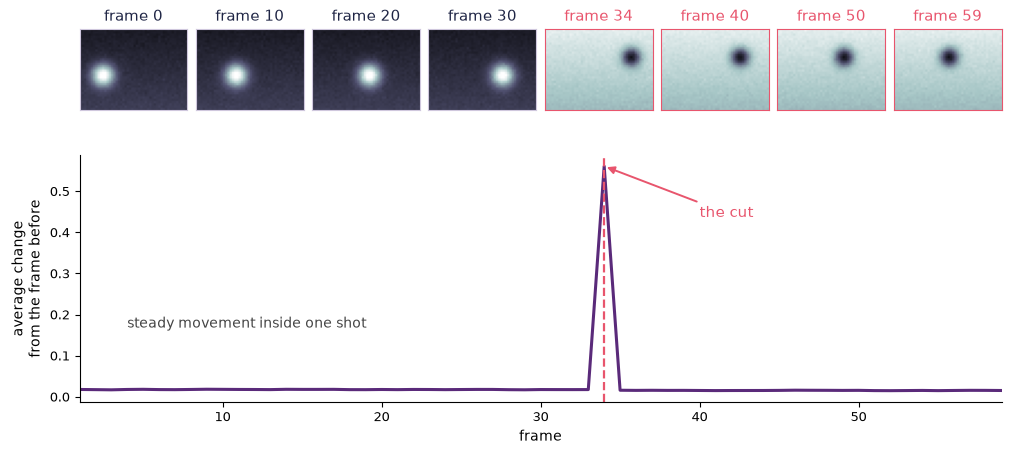
Figure: A synthetic clip with a cut at frame 34, and the average change from one frame to the next below it, where the cut is the one place the curve leaves the floor.
Aspect ratio as a compositional decision. 16:9 for landscape work, 9:16 for the vertical feeds. This is not an export setting, because a composition built for one shape does not survive being cropped into the other. Framing a walking figure for a vertical frame is a different job from framing them for a wide one.
The change-one-knob discipline from chapter 5 applies here with more force, because each generation costs more and you get fewer of them. If you change the motion words and the camera words at once, you have spent two generations to learn nothing.
Where video AI actually fits
A realistic pipeline in 2026 has five steps, and only two of them are generative.
- Storyboard with an image model, following chapter 5, until you have a frame you are happy with for every shot. This is where seed locking and reference images earn their keep, because shots that share a look at storyboard stage are much likelier to cut together later.
- Animate each approved frame with image-to-video, using end-frame conditioning where the shot has a clear destination.
- Stitch the shots in a video editor. A free, professional-grade editor is enough for everything in this course.
- Add audio: voice, music, Foley, and ambience, using chapter 6.
- Grade and finish in the same editor, which is also where you add the provenance card.
Source
from matplotlib.patches import FancyBboxPatch

import matplotlib.pyplot as plt
plt.rcParams.update({
    "font.size": 10,
    "axes.titlesize": 11,
    "axes.labelsize": 10,
    "xtick.labelsize": 9,
    "ytick.labelsize": 9,
    "legend.fontsize": 9,
    "figure.figsize": (10, 4),
    "figure.dpi": 100,
    "savefig.dpi": 150,
    "axes.spines.top": False,
    "axes.spines.right": False,
})

navy, purple, rose = "#1f2545", "#5a2a7a", "#e8556d"

steps = [("1 Storyboard", "an image model", True),
         ("2 Animate", "image to video", True),
         ("3 Stitch", "a video editor", False),
         ("4 Add audio", "voice, music, Foley", False),
         ("5 Grade\nand finish", "the same editor", False)]

fig, ax = plt.subplots(figsize=(10, 3.6))
width, gap = 2.1, 0.35
for index, (name, gloss, generative) in enumerate(steps):
    x = 0.3 + index * (width + gap)
    ax.add_patch(FancyBboxPatch((x, 1.5), width, 1.35,
                                boxstyle="round,pad=0.02,rounding_size=0.14",
                                facecolor="#f4f1fa" if generative else "#fbfaff",
                                edgecolor=purple if generative else "#cfc7dd",
                                linewidth=2.0 if generative else 1.5))
    ax.text(x + width / 2, 2.36, name, ha="center", va="center", fontsize=11,
            fontweight="bold", color=navy, linespacing=1.3)
    ax.text(x + width / 2, 1.85, gloss, ha="center", va="center", fontsize=10,
            color="#444444")
    if index < len(steps) - 1:
        ax.annotate("", xy=(x + width + gap - 0.05, 2.175), xytext=(x + width + 0.05, 2.175),
                    arrowprops=dict(arrowstyle="-|>", color=navy, lw=1.6))

ax.plot([0.3, 4.75], [1.15, 1.15], color=purple, lw=2.4)
ax.text(2.5, 0.85, "generated", ha="center", fontsize=11, fontweight="bold",
        color=purple)
ax.plot([5.2, 12.4], [1.15, 1.15], color=rose, lw=2.4)
ax.text(8.8, 0.85, "edited, and where most of the perceived quality comes from",
        ha="center", fontsize=11, fontweight="bold", color=rose)

ax.set_xlim(0, 12.7)
ax.set_ylim(0.5, 3.1)
ax.axis("off")
plt.tight_layout()
plt.show()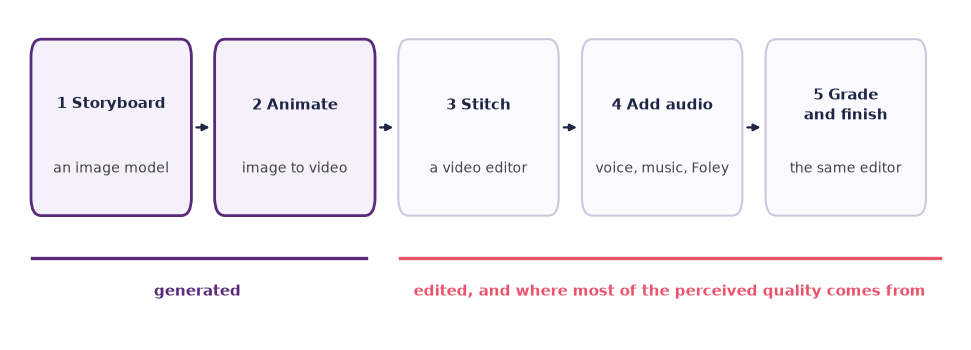
Figure: Only the first two steps of a realistic video pipeline are generated, and the rest is editorial work that decides most of what an audience notices.
Notice the shape of that list. The parts most transformed by AI are the first and the second, storyboarding and animation. The traditional editorial work, which is pacing, sound design, and colour, remains very human, and it is also where most of the perceived quality of a finished piece actually comes from. A weak edit ruins good shots, and a strong edit rescues mediocre ones. That asymmetry is worth remembering when you get to the critical look at the end of this chapter.
Lip-sync and avatars
One genre of video AI deserves separate treatment: the talking head. Upload a photograph or a short clip of a person, or pick one from a stock library, drive it with synthetic speech, and you get a video of that person saying anything you type. Multilingual versions of the same presenter are a checkbox.
The legitimate uses are real and dull, which is a good sign for a technology. Corporate training, product explainers, translated versions of a recorded lecture, and localised marketing all involve saying scripted words to camera. That is a task that is expensive to film and cheap to fake, and one where nobody is deceived about what they are watching.
The same tool is also close to ideal for personal and political manipulation, and the distance between the two uses is not technical but a matter of consent and labelling. Chapter 6 makes this argument for the voice, and every word of it applies to the face, with the aggravation that a face is harder to deny than a voice and easier to circulate. Chapter 3 sets out where the law had reached by 2026, including the transparency obligations in the EU AI Act for material of this kind European Parliament,Council of the European Union, 2024European Commission, Directorate-General for Communications Networks, Content,Technology, 2024.
The working rule for this course is short. If a real person appears, you have their explicit, informed, written consent for this specific use, and the output is labelled where a viewer will see it. There is no version of the exercise that is worth breaking that rule for.
World models
Something is converging that was not obviously the same problem five years ago. A video model predicts what the next frames look like. A game engine computes what the next frame looks like given what the player just did. A model that predicts the next frame conditioned on an action is doing both at once, and what you have then is not a clip but a place you can move around in.
The clearest public demonstration is Genie, which learned from unlabelled internet video of people playing games and produced an interactive environment that responds to a latent action input, without ever being shown which button caused which change Bruce et al., 2024. That is the important part. The controls were not annotated in the training data; the model inferred that some component of the change between frames was caused by an agent, and exposed it as something you can drive. Systems along these lines are usually called world models: generative models whose output is a navigable state rather than a finished artefact.
For games, this points at content that is generated as it is played rather than authored in advance, and at prototyping a playable feel before any assets exist. Both are genuinely useful and neither is close to replacing a designed level, because the thing a world model is worst at is precisely the thing a game most needs, which is a rule that holds. Chapter 8 takes up spatial and three-dimensional generation directly, and the tension there is the same one. A scene you can walk through has to stay put while you walk through it, and a model that predicts plausible next frames has no obligation to keep anything.
Keep one distinction clear as this area moves. A world model that is impressive to watch and a world model that is consistent enough to build on are different achievements, and by 2026 the public demonstrations are much further along on the first than the second.
Cost and access
Video remains the most computationally expensive medium per second of output, and this shapes the practical experience more than any other factor in this chapter.
Generating a few seconds of video costs, in round terms, on the order of a hundred image generations. Consumer services therefore meter video in credits rather than in requests, and a single clip consumes a noticeable fraction of a monthly allowance. Free tiers are tight enough that you should assume you get a handful of attempts rather than a session of experimentation. Prices and allowances change every few months, so check the current terms rather than trusting any figure printed in a book, including this one.
Two consequences for your practice. Plan before you generate, because in this medium iteration is a budget rather than a habit, and the storyboard is what stops you spending five clips discovering what one sketch would have told you. And do the work in a hosted tool unless you have a workstation with a serious accelerator. Local video generation is possible with open-weight models, and on a laptop with integrated graphics it is a way of watching a progress bar rather than a way of making a film.
Dig deeper: what the systems are called
The body of this chapter deliberately describes categories rather than products, because the products change faster than the book can be revised and the categories have been stable since 2024. For the record, and because you will meet the names immediately when you start searching, the systems that defined this period include Sora, Veo, Runway, Kling, Pika, and Luma for general text-to-video and image-to-video. HeyGen, Synthesia, and D-ID do talking heads. DaVinci Resolve is the free professional editor referred to in the workflow above; Premiere, Final Cut, and CapCut do the same job.
Two of these are worth reading rather than only using. The Sora system card is the developer’s own account of what the model refuses, what it gets wrong, and what it was trained to avoid, and it is unusually candid about limits OpenAI, 2024. The Runway research blog tracks the model-side developments in a form aimed at people who make things Runway, 2024.
This week’s lab: Explore, Reflect, Create
Three movements: find out what image-to-video actually gives you, argue about the results with someone else, and cut three shots into a piece you would show.
The ethics essay is due this week. It was set in week 3, so keep time clear for it before you start generating; the video work below is a portfolio piece and does not replace it.
Explore (about 30 min)
One image, three variations.
- Generate or choose a strong still image of a clear subject in a clear scene, using chapter 5. Your own photograph is better than a generated one if you have a suitable one.
- Run image-to-video on it with a short motion prompt, for example the subject turns their head slowly to the right while the camera pushes in.
- Generate three variations, changing one thing each time: the motion, then the camera move, then the duration. Keep the source image fixed, because it is your control.
- Now generate an end frame with the image model and re-run the shot conditioned on both the first and the last frame. Compare it against the best of your three.
- Write down in one sentence where coherence held and where it broke. Be specific about when in the clip it broke, because the moment of failure tells you far more than the fact of it.
Budget note: that is five generations, which on a free tier may be most of what you have. Decide your five before you spend any of them.
Optional. Step through your variations side by side in the Frame-consistency inspector.
Reflect (about 15 min)
Work in pairs. This is a discussion, not a writing block.
- Watch each other’s four clips in silence, twice. Then use these three questions on each partner’s best one: one thing the AI clearly did well, one thing that gives it away, and one thing that would be the next step. Say all three out loud, in that order, and be concrete, because “it looks a bit off” ends the conversation instead of starting it.
- Compare your end-frame version against your best free-running one and agree on which is better and why. If the free-running one won, work out what the end frame took away.
- Close the round by each stating aloud the three-shot piece you are about to make: the idea, the three shots, and what the cut between shot one and shot two is doing.
Create (about 45 min)
Make a thirty-second piece from three shots.
Storyboard three shots of a small idea, for example a tourist arriving in Oslo at sunrise. One idea, three angles on it, a beginning and an end.
Generate each shot, three to five seconds each, using image-to-video from a storyboard frame rather than text-to-video from a sentence.
If your allowance runs out here, animate one shot and hold the other two as still frames, adding a slow push or a pan to each in the editor. One generated shot cut against two moving stills is a complete answer to this brief, and the cut is still yours.
Add an ambient soundtrack made with chapter 6. Sound is where thirty seconds of clips becomes a piece.
Edit the three shots together in a video editor, and pay attention to the cut points. This is the part of the pipeline the model did not do and cannot do for you.
Add a provenance card as a final frame, white text on black: tools, models, year, and what is generated. This is good practice now and, for material of this kind, moving towards being required under the EU AI Act European Parliament,Council of the European Union, 2024European Commission, Directorate-General for Communications Networks, Content,Technology, 2024.
Watch it twice, then write down what works, what does not, and what you would redo. Commit the piece and the card to your portfolio.
A3 is due next week. Multimodal mini-piece was set in week 6 and is due in week 8, and this three-shot piece is a strong candidate component of it. If that is your plan, decide now what the piece is about, because thirty seconds of good footage with no argument attached is hard to place in a submission.
At home, write this week’s entry in your practice log using the practice log template.
A critical look: will AI video replace film crews?
The claim. Video generation is on the same curve images were on in 2022, and it is about to do to film what image models did to illustration. Within a few years a director with a laptop will make a feature, and the crew, the camera department, the location scout, and the extras will go the way of the darkroom technician.
The evidence. Look at what has actually shipped by 2026, because that is a shorter and more informative list than the projections. Generated video is in commercial use for advertising inserts, B-roll in documentary and news-adjacent work, music videos, title sequences, and previsualisation, the rough version of a sequence made before the real shoot in order to plan it. In each case the common factor is that the shot is short, non-speaking, and not required to match a specific other shot. There is no known sustained narrative feature film made this way, and the absence is not for lack of trying or funding. The developers agree. The system card published alongside one of the leading text-to-video models sets out that model’s own limits, including physical implausibility, difficulty with cause and effect over time, and confusion in scenes with several interacting subjects OpenAI, 2024. When the organisation with the strongest commercial interest in the capability publishes the list of things it cannot do, that list is worth more than a press cycle. The Stanford AI Index tracks the same trajectory across the field year by year and is the better source than any single launch for how fast the underlying capability is actually moving Maslej et al., 2024.
The method. Ask how the impressive examples were produced, because almost everything circulating is a demo reel, and a demo reel is a selected artefact. A reel is cut from many attempts, the ratio is almost never reported, and the shots that are kept are exactly the ones where the model happened to hold together. That selection is not dishonest, and it is what a showreel has always been, but it makes the reel evidence for “this system can sometimes produce a good shot” and not for “this system can produce the shot you need”. Production work poses the opposite question. It asks for a specific shot, matching an established look, on a schedule, and asks for it again tomorrow when the client wants the jacket changed. A model with a high ceiling and a low floor is excellent for the first question and unreliable for the second, and the gap between them is where the crew still lives. When you evaluate a claim in this area, look for the denominator: how many generations were run, how many were kept, and who chose.
The limits. So the honest version of the claim is narrower and still substantial. The parts of the pipeline that have genuinely been transformed are storyboarding and animation, which is to say the front end, where AI has made things possible for people who previously could not afford to try at all. The parts that have not been transformed are pacing, sound, and colour, which are where a piece is made watchable and where the working hours mostly are. That is not a permanent boundary, but it is not a matter of the models improving by another notch either, because those tasks are about judgement against an intention rather than plausibility. And the framing of the whole question as a technical one is itself the problem, as chapter 3 argued. Whether a crew is employed is a decision made by people with budgets. A tool that removes the cheapest tier of work first will be felt first by the people with the least security in the industry, whether or not it is good enough to replace them. “Can it?” and “will they?” are different questions, and the second is not answered by watching a reel.
- Regulation (EU) 2024/1689 — The AI Act. (2024). European Parliament. https://eur-lex.europa.eu/eli/reg/2024/1689/oj
- Regulatory Framework on AI — Official Summary. (2024). European Commission, Directorate-General for Communications Networks, Content. https://digital-strategy.ec.europa.eu/en/policies/regulatory-framework-ai
- Bruce, J., Dennis, M., Edwards, A., Parker-Holder, J., Shi, Y., Hughes, E., Lai, M., Mavalankar, A., Steigerwald, R., Apps, C., Aytar, Y., Bechtle, S., Behbahani, F., Chan, S., Heess, N., Gonzalez, L., Osindero, S., Ozair, S., Reed, S., … Rocktäschel, T. (2024). Genie: Generative interactive environments. Proceedings of the 41st International Conference on Machine Learning. https://arxiv.org/abs/2402.15391
- OpenAI. (2024). Sora — Creating Video from Text. OpenAI. https://openai.com/sora
- Runway. (2024). Runway Research. Runway. https://runwayml.com/research
- fourMs Lab. (2026). Musical Gestures Toolbox for Python. https://github.com/fourMs/MGT-python
- Maslej, N., Fattorini, L., Perrault, R., Parli, V., Reuel, A., Brynjolfsson, E., Etchemendy, J., Ligett, K., Lyons, T., Manyika, J., Niebles, J. C., Shoham, Y., Wald, R., & Clark, J. (2024). The AI Index Report. Stanford Institute for Human-Centered Artificial Intelligence. https://aiindex.stanford.edu/report/
- Coalition for Content Provenance and Authenticity. (2024). C2PA technical specification. https://c2pa.org/specifications/