This chapter works at the practice layer of the five layers. The models under discussion are the same language models from chapter 4, and nothing new happens at the model layer this week. What changes is the working arrangement: code is the one medium where the output can be checked by running it, so the craft here is less about steering a generator and more about supervising one.
Programming is the discipline generative AI has changed first and fastest. Since 2022 a student with no programming background has been able to produce working code by describing what they want in ordinary language, and by 2026 the assistant sits inside the editor rather than in a separate browser tab. For creative coding, meaning graphics, sound, generative art, and interactive pieces, the change is doubled, because the model helps you write the code and can also generate the material the code arranges.
This chapter is for everyone, whether or not you have programmed before. The aim is not to make you a fluent writer of JavaScript in one week. It is to leave you able to read a hundred lines you did not write, say what each part does, and notice when a piece of it is wrong.
AI coding assistants in 2026
By 2026 writing code with an assistant in the editor is the ordinary way of working in most professional settings. There is no reliable public census of how widespread it is, and the surveys that report figures are answered by people who chose to answer them, so treat any percentage you meet with suspicion. What is not in doubt is that the tooling has settled into four patterns, and they have been stable since about 2023 even though the products carrying them have not.
Tab completion. The assistant proposes the next line or block as you type, in grey text you accept with a keystroke. This is the oldest of the four, dating from 2021, and the most invisible, because you never asked for the suggestion and it arrives while you are mid-thought.
Chat in the editor. A side panel that can see your open files and answer in plain language. You paste a function and ask what it does, or describe a change and ask how to make it. Nothing is applied until you apply it.
Inline edit. You select a region of code, describe the change in a sentence, and the assistant returns a diff you accept or reject. This is the pattern with the tightest feedback loop, because the unit of work is small enough to read in full.
Agentic. You describe a task and the assistant plans it, edits several files, runs the code, reads the error message, and tries again, reporting back when it thinks it is done. This is the newest of the four. It became usable during 2024 and 2025, and it is the one where the most code passes without a human reading it.
The four differ in one respect that matters more than any feature comparison: how much unreviewed code each one puts into your project per interaction. Tab completion adds a line, inline edit adds a paragraph, chat adds whatever you paste in, and an agentic run can add several files. Your ability to supervise does not scale at the same rate, which is the practical argument for starting where the units are small.
Source
from matplotlib.patches import FancyBboxPatch, Rectangle

import matplotlib.pyplot as plt
plt.rcParams.update({
    "font.size": 10,
    "axes.titlesize": 11,
    "axes.labelsize": 10,
    "xtick.labelsize": 9,
    "ytick.labelsize": 9,
    "legend.fontsize": 9,
    "figure.figsize": (10, 4),
    "figure.dpi": 100,
    "savefig.dpi": 150,
    "axes.spines.top": False,
    "axes.spines.right": False,
})

navy, purple, rose = "#1f2545", "#5a2a7a", "#e8556d"
patterns = [
    ("Tab completion", 0.7, "a line"),
    ("Inline edit", 2.2, "a paragraph"),
    ("Chat in the editor", 4.2, "whatever you paste in"),
    ("Agentic", 7.6, "several files"),
]

fig, ax = plt.subplots(figsize=(10, 4.2))
ax.text(0.4, 5.05, "Four patterns, ordered by the code they add before anybody reads it",
        fontsize=11, fontweight="bold", color=purple)

for i, (name, length, gloss) in enumerate(patterns):
    y = 3.85 - i * 0.9
    widest = i == len(patterns) - 1
    ax.add_patch(FancyBboxPatch((0.4, y), 3.2, 0.7,
                                boxstyle="round,pad=0.02,rounding_size=0.12",
                                facecolor="#fff0f3" if widest else "#f4f1fa",
                                edgecolor=rose if widest else purple, linewidth=1.8))
    ax.text(2.0, y + 0.35, name, ha="center", va="center", fontsize=11, color=navy)
    ax.add_patch(Rectangle((4.0, y + 0.17), length, 0.36,
                           facecolor=rose if widest else purple))
    ax.text(4.0 + length + 0.15, y + 0.35, gloss, va="center", fontsize=10,
            color="#444444")

ax.annotate("", xy=(11.6, 0.85), xytext=(4.0, 0.85),
            arrowprops=dict(arrowstyle="-|>", color="#8a8598", lw=1.8))
ax.text(4.0, 0.35, "your ability to supervise does not grow along this axis",
        fontsize=10, color=rose)

ax.set_xlim(0, 12)
ax.set_ylim(0.1, 5.4)
ax.axis("off")
plt.tight_layout()
plt.show()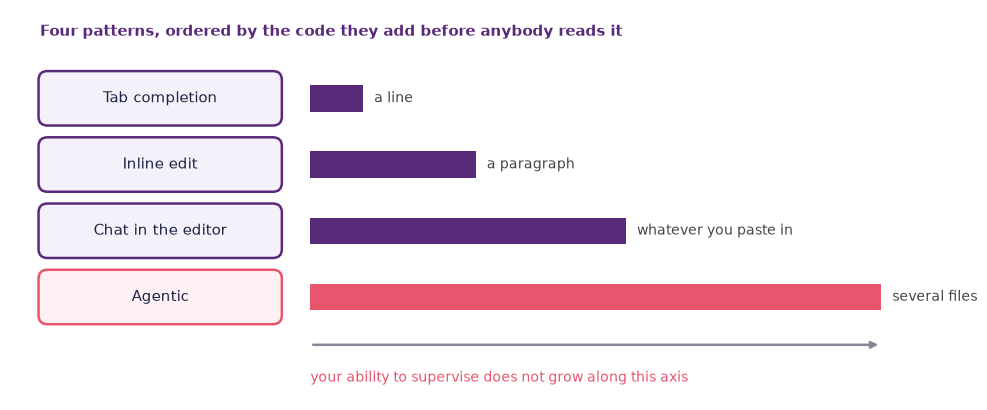
Figure: The four patterns of coding assistance, ordered by how much unreviewed code each one adds per interaction, from the single line of a tab completion to the several files an agentic run touches.
For a beginner the most useful pattern is chat in the editor, driven by three verbs: explain, fix, and refactor. You write a draft, or paste an example, the assistant explains it, you ask for a change, you run it, you iterate. Everything in this chapter’s lab can be done that way.
Reading before writing
That last point deserves a section of its own, because it inverts how programming has been taught for fifty years.
The traditional order is: learn the syntax, write small programs, gradually read larger ones. The order that works with an assistant is the reverse. You will be handed working code within your first ten minutes, long before you could have produced it. From that moment on, the binding constraint on what you can build is not how fast you can write; it is whether you can tell good code from code that merely runs.
Call this supervision, and notice that it is a reading skill. Everything you do to an assistant’s output, deciding whether to accept it, spotting the case it did not handle, saying why one of two versions is better, is an act of reading. A model can produce more code in a minute than you can write in a day, so the bottleneck moved, and it moved to the one place the model cannot help you: judging its own work.
Reading code is also an unusually forgiving skill to acquire, because you have a machine that will explain any line you point at. Ask what a variable holds, what a loop is iterating over, what happens if a value is zero, at no cost and with no one watching.
The habit that turns this into learning is explain-back. Take a function the assistant wrote for you and explain it, in your own words and in writing, line by line, before you look at any explanation. Then ask the assistant to check your account and tell you what you missed. The order matters. If you read the explanation first you will find it convincing, because a fluent explanation of code is exactly what a language model is good at producing, and agreeing with it feels like understanding.
Explain-back is uncomfortable for about a week and then becomes fast. It is also the cheapest test available of whether you have learned anything, since the gap between “I followed that” and “I can say that” is where the illusion of competence lives.
This is why the course grades reading and explaining alongside shipping. Your practice log asks what you understood and what you changed, not only what you produced. A sketch that runs beautifully and that you cannot account for is worth less here than a plainer one you can take apart. The first will fail in week 12, when it needs one more feature and nobody in the room knows where anything is.
There is a professional version of the same argument. Code is read far more often than it is written. It is maintained by people who were not there when it was written, and a codebase nobody can explain is a liability whoever or whatever produced it. Assistants have not changed that, and they have made it much easier to build one by accident.
The next section gives you twenty lines to practise on. One loop in it counts backwards, and working out why it has to is the whole exercise.
A worked example in p5.js
p5.js is a JavaScript library descended from Processing, designed for visual sketches and maintained by the Processing Foundation Processing Foundation, 2024. Both are open-source creative-coding environments with large teaching communities behind them. You can use p5.js directly in your browser at the p5.js web editor without installing anything, which is why this course uses it.
A canonical “hello world” sketch:
function setup() {
  createCanvas(400, 400);
}

function draw() {
  background(20);
  noStroke();
  fill(255);
  circle(mouseX, mouseY, 40);
}
Two functions do all the work. setup runs once and makes the canvas. draw runs about sixty times a second, and everything in it happens again on every frame. That single fact explains most of what beginners find surprising about p5.js, including why the screen is repainted from scratch each time and why removing the background line leaves a trail.
Now a prompt, which you can send even if you have never seen JavaScript before:
“Modify this p5.js sketch so that instead of a single circle, twenty circles follow the mouse with a trailing delay, and their colour cycles through hues over time.”
A capable assistant in 2026 will produce something close to this:
let circles = [];
const N = 20;

function setup() {
  createCanvas(400, 400);
  colorMode(HSB, 360, 100, 100, 1);
  for (let i = 0; i < N; i++) circles.push({ x: 200, y: 200 });
}

function draw() {
  background(20);
  noStroke();
  for (let i = N - 1; i > 0; i--) {
    circles[i].x = circles[i - 1].x;
    circles[i].y = circles[i - 1].y;
  }
  circles[0].x = mouseX;
  circles[0].y = mouseY;

  for (let i = 0; i < N; i++) {
    fill((frameCount + i * 18) % 360, 70, 90);
    circle(circles[i].x, circles[i].y, 40 - i * 1.5);
  }
}
Before you run it, practise the reading. Two pieces of notation carry the loops. Writing circles[i] picks out the item at position i in a list, and the % sign is the remainder operator, which wraps a rising number back around to a fixed range. The first loop counts backwards, and it has to, because each circle copies the position of the one in front of it and counting forwards would copy the new position instead of the old one. That single detail is the whole trailing effect. It is the kind of thing that produces a sketch which looks almost right, and no error message would ever have told you about it.
Then run it, break it, and put it back. Set N to 200. Delete the background line. Change 40 - i * 1.5 to 40 + i * 1.5 and work out why the trail now grows instead of tapering. Ask for changes in the same conversation: make the trail spring rather than follow linearly, add a glow, make it react to the microphone. The loop is show me, tweak, repeat, and the tweaking is where the learning is.
How to talk to a coding assistant
Some habits pay off immediately.
Say what kind of code you want. “Vanilla JavaScript, no frameworks.” “Python with numpy.” “p5.js running in the browser.” Without that, the assistant defaults to whatever was most common in its training data, which for JavaScript means a framework you did not ask for and cannot install in a web editor.
Show the smallest example that fails. Do not paste the whole project. A short reproduction is easier for the model to reason about, for the same reason it is easier for a person, and cutting it down often finds the bug before you send it.
Ask for an explanation before you ask for a fix. “Explain this function line by line as if I have never seen JavaScript.” An assistant that has explained its own code is easier to argue with, and you get the vocabulary you need for the next question.
Ask for the failure cases. “What input would break this?” is a better question than “is this correct?”, because the second invites agreement and the first invites work.
Ask for tests. “Write three small tests for this function, including one that should fail.” Tests catch the mistakes neither of you can see by reading.
Change one thing at a time. The discipline from chapter 5 applies here too. If you accept three suggestions and then run the sketch, you have learned nothing about which of them broke it.
Re-anchor often. Long conversations drift, and an assistant fifty messages deep is still carrying decisions you abandoned twenty messages ago. Start a new chat for a new task and paste in the current state of the code.
Verify by running it. Models are wrong more often in code than in prose, and code is the one medium in this book where being wrong is instantly and cheaply detectable. That is the largest advantage this chapter has over every other chapter in the course.
Generative graphics, sound and interactivity
Beyond writing the code, a model can also generate what the code arranges. That is the second half of creative coding with AI, and it is where the previous chapters come back.
- Sprites, characters, and textures for a game or a scene, using chapter 8.
- Backgrounds, skies, and reference frames for an interactive piece, using chapter 5.
- Sound effects and ambience for events and buttons, using chapter 6.
- Voices for characters, narration, and tutorials, with the consent rules from chapter 3 attached.
A workable pipeline has four steps:
- Sketch the idea on paper, including what the piece is for.
- Generate placeholder assets with image and audio tools, deliberately rough.
- Wire them together in code with an assistant.
- Iterate on each piece separately, keeping the wiring fixed while you improve the assets and the assets fixed while you improve the wiring.
That last clause is the whole trick, the modern equivalent of prototyping a board game in cardboard, and it works for the same reason: it lets you find out whether the idea is any good before anything is expensive.
One warning: placeholder assets have a way of becoming final assets, because replacing them is work and the piece already runs. Decide at step one which parts are meant to be generated in the finished piece and which are standing in for something you intend to make, shoot, or record yourself. Write that decision in your log, where you will see it again.
Live coding
Some code is written in front of an audience. Live coding means writing and changing a program while it runs, so that the sound or the image shifts as the text on the screen changes. The convention is to project the editor. The draft manifesto of the TOPLAP collective, founded in 2004, puts the ethic in four words: “Show us your screens.” Blackwell and colleagues collect the history, the tools, and the arguments in one open-access volume Blackwell et al., 2022.
The practice belongs in a book about creative AI for three reasons. The programmer becomes a performer, so the writing is the show rather than a step towards it. The language becomes an instrument, judged the way instruments are judged, on how quickly a musical thought reaches the loudspeakers. And an assistant raises a question the older scene never had to answer, about what is left of a performance when something else writes the next line faster than a person can type.
Glicol is the easiest place to begin, since it runs in a browser tab with nothing installed. The name is short for graph-oriented live coding language, and the syntax follows the signal path. A line names a node, >> sends its output onward, and the chain reads as an oscillator into a filter into the output. Language and audio engine are both written in Rust and compiled to WebAssembly, which is where the near-native performance comes from. Glicol grew out of Qichao Lan’s doctoral work at RITMO, University of Oslo, and has been performed collaboratively over the web Lan & Jensenius, 2021.
Source
from matplotlib.patches import FancyBboxPatch

import matplotlib.pyplot as plt
plt.rcParams.update({
    "font.size": 10,
    "axes.titlesize": 11,
    "axes.labelsize": 10,
    "xtick.labelsize": 9,
    "ytick.labelsize": 9,
    "legend.fontsize": 9,
    "figure.figsize": (10, 4),
    "figure.dpi": 100,
    "savefig.dpi": 150,
    "axes.spines.top": False,
    "axes.spines.right": False,
})

navy, purple, rose = "#1f2545", "#5a2a7a", "#e8556d"

fig, ax = plt.subplots(figsize=(10, 3.8))
ax.text(0.4, 4.35, "The line on the projected screen", fontsize=11,
        fontweight="bold", color=purple)
ax.add_patch(FancyBboxPatch((0.4, 3.4), 11.2, 0.75,
                            boxstyle="round,pad=0.02,rounding_size=0.1",
                            facecolor=navy, edgecolor=navy))
ax.text(0.8, 3.775, "o: saw 220 >> lpf 800 1.0 >> mul 0.4", va="center",
        fontsize=11, family="monospace", color="#e7e5e4")

ax.text(0.4, 2.75, "The signal chain it names", fontsize=11,
        fontweight="bold", color=purple)
ax.text(11.6, 2.75, "each name in the line is a node in the chain", ha="right",
        fontsize=10, color=rose)

nodes = [(0.4, "oscillator", "a sawtooth at 220 Hz", False),
         (4.4, "filter", "cutting above 800 Hz", False),
         (8.4, "output", "at four tenths of full gain", True)]
for x, name, gloss, outcome in nodes:
    ax.add_patch(FancyBboxPatch((x, 1.35), 2.9, 0.85,
                                boxstyle="round,pad=0.02,rounding_size=0.12",
                                facecolor="#fff0f3" if outcome else "#f4f1fa",
                                edgecolor=rose if outcome else purple, linewidth=1.8))
    ax.text(x + 1.45, 1.92, name, ha="center", va="center", fontsize=11, color=navy)
    ax.text(x + 1.45, 1.58, gloss, ha="center", va="center", fontsize=10, color="#444444")
for x1, x2 in [(3.3, 4.4), (7.3, 8.4)]:
    ax.annotate("", xy=(x2, 1.775), xytext=(x1, 1.775),
                arrowprops=dict(arrowstyle="-|>", color=navy, lw=1.8))

ax.text(6.0, 0.55, "The program keeps running while it is edited, "
        "so a change to the line changes the sound in place.",
        ha="center", fontsize=10, color=navy)

ax.set_xlim(0, 12)
ax.set_ylim(0.2, 4.7)
ax.axis("off")
plt.tight_layout()
plt.show()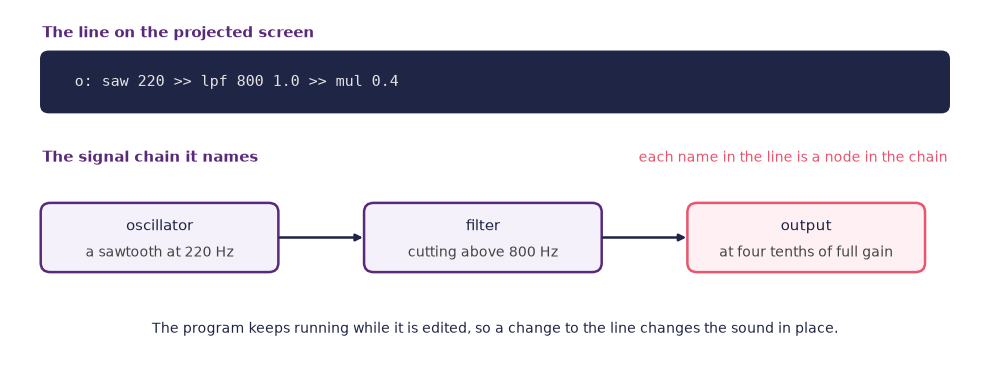
Figure: One line of code names a chain of nodes, an oscillator into a filter into an output, so the sound follows the reading order of the text.
An introduction to Glicol, the browser-based live coding language that grew out of doctoral work at RITMO, University of Oslo.
synth.is, developed by Björn Þór Jónsson at RITMO, comes at the same material from the other end. Rather than writing a synthesis graph, you breed one. An evolutionary search proposes sound-producing networks, a listener keeps whatever is worth keeping, and the next generation grows from those choices Jónsson et al., 2015. The project has since made the resulting family tree performable, so a live coder travels a lineage of discovered sounds rather than typing each one Jónsson et al., 2025. That is the bridge to the next section.
The wider scene is larger than these two. TidalCycles expresses rhythm as patterns of cycles, and Strudel brings the same notation to the browser. Sonic Pi was built for classrooms and is still the gentlest way in. Hydra live-codes visuals rather than sound and is often projected alongside a music set. SuperCollider sits underneath a good deal of it, and the club events where people dance to it are called algoraves.
One tension is worth carrying into the lab. Liveness here rests on an audience watching a person think at a keyboard, so an assistant that finishes the line before it is typed changes what the room is watching.
Rules and evolution as creative material
Creative coding did not begin with assistants, and it did not begin with models. Its older practice is procedural: you write a small routine, run it a great many times, and watch what comes out of the parts interacting. Chapter 2 named two families of that kind, rules and evolution, and set them beside learning. This is where you write one of each.
Four patterns cover most of the territory. L-systems rewrite a string of symbols over and over according to a few rules, then read the result as turtle-drawing commands, which is how a handful of lines produces a fern or a coastline Prusinkiewicz & Lindenmayer, 1990. Cellular automata update a grid from the states of neighbouring cells, of which Conway’s Game of Life is the famous instance. Noise fields use a smooth pseudo-random function, noise() in p5.js, to give organic drift to positions, colours, and flow lines. Recursive subdivision splits a rectangle, then splits the pieces, and keeps going until a stopping rule bites. The same four patterns work on words. A grammar that rewrites symbols can rewrite phrases just as easily, which is how generative poetry has been written since the 1950s, and a noise field can drive a line break as well as a brush stroke.
Source
import numpy as np

import matplotlib.pyplot as plt
plt.rcParams.update({
    "font.size": 10,
    "axes.titlesize": 11,
    "axes.labelsize": 10,
    "xtick.labelsize": 9,
    "ytick.labelsize": 9,
    "legend.fontsize": 9,
    "figure.figsize": (10, 4),
    "figure.dpi": 100,
    "savefig.dpi": 150,
    "axes.spines.top": False,
    "axes.spines.right": False,
})

navy, purple, rose = "#1f2545", "#5a2a7a", "#e8556d"

axiom = "F"
rules = {"F": "FF+[+F-F-F]-[-F+F+F]"}
angle = np.radians(23)


def grow(string, times):
    for _ in range(times):
        string = "".join(rules.get(symbol, symbol) for symbol in string)
    return string


def draw(ax, string):
    x, y, heading = 0.0, 0.0, np.pi / 2
    stack, segments = [], []
    for symbol in string:
        if symbol == "F":
            nx, ny = x + np.cos(heading), y + np.sin(heading)
            segments.append(((x, y), (nx, ny)))
            x, y = nx, ny
        elif symbol == "+":
            heading += angle
        elif symbol == "-":
            heading -= angle
        elif symbol == "[":
            stack.append((x, y, heading))
        elif symbol == "]":
            x, y, heading = stack.pop()
    for (x1, y1), (x2, y2) in segments:
        ax.plot([x1, x2], [y1, y2], color=purple, lw=1.0, solid_capstyle="round")
    points = np.array([point for segment in segments for point in segment])
    span = max(np.ptp(points[:, 0]), np.ptp(points[:, 1]), 1.0) * 0.62
    ax.set_xlim(points[:, 0].mean() - span, points[:, 0].mean() + span)
    ax.set_ylim(points[:, 1].min() - 0.1 * span, points[:, 1].min() + 1.95 * span)
    return len(segments)


fig, axes = plt.subplots(1, 4, figsize=(10, 3.8))
for step, ax in enumerate(axes):
    string = grow(axiom, step)
    count = draw(ax, string)
    heading = "the starting symbol" if step == 0 else (
        "after one rewrite" if step == 1 else f"after {step} rewrites")
    ax.set_title(heading, fontweight="bold", color=purple, pad=8)
    words = ("1 symbol and 1 line" if count == 1
             else f"{len(string)} symbols and {count} lines")
    ax.set_xlabel(words, color="#444444", labelpad=6)
    ax.set_aspect("equal")
    ax.set_xticks([])
    ax.set_yticks([])
    for side in ax.spines.values():
        side.set_visible(False)

fig.text(0.5, 0.015, "one rule, F becomes FF+[+F-F-F]-[-F+F+F], applied to its own "
         "output", ha="center", fontsize=10, color=navy)
plt.tight_layout(rect=(0, 0.055, 1, 1))
plt.show()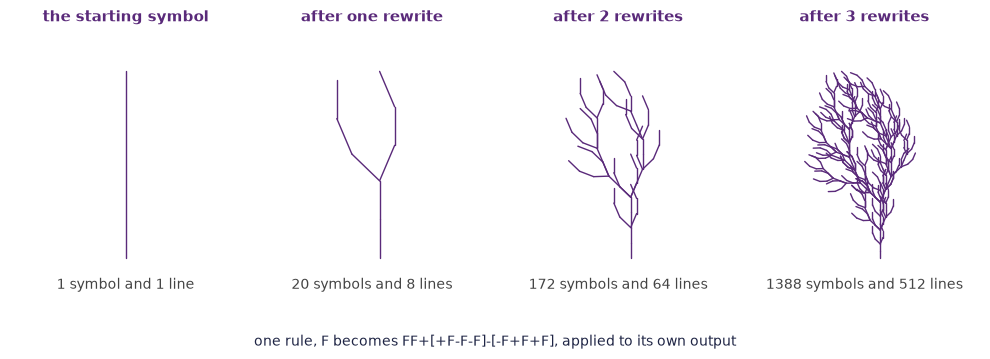
Figure: One rewriting rule applied to its own output three times, where the tree is nowhere in the rule and comes entirely out of the repetition.
Here is the second pattern in twenty-odd lines. Each row of pixels is one generation, and every cell takes the exclusive-or of its two neighbours in the row above.
let row = [];
const CELL = 4;

function setup() {
  createCanvas(400, 400);
  noStroke();
  background(255);
  for (let i = 0; i < width / CELL; i++) row.push(0);
  row[floor(row.length / 2)] = 1;
}

function draw() {
  const y = frameCount * CELL;
  if (y > height) return;
  for (let i = 0; i < row.length; i++) {
    fill(row[i] ? 20 : 255);
    rect(i * CELL, y, CELL, CELL);
  }
  const next = [];
  for (let i = 0; i < row.length; i++) {
    next[i] = row[(i - 1 + row.length) % row.length] ^ row[(i + 1) % row.length];
  }
  row = next;
}
Paste it into the web editor and watch a triangle assemble itself out of a rule that contains no triangle. Then change the two lines that matter. Seed the first row at random rather than with a single cell, and swap the exclusive-or for another combination of the two neighbours, or bring row[i] itself into the rule so that each cell reads three cells rather than two. Each rule gives a different texture, and none of them is more work to write than this one.
Source
import numpy as np
from matplotlib.patches import Rectangle

import matplotlib.pyplot as plt
plt.rcParams.update({
    "font.size": 10,
    "axes.titlesize": 11,
    "axes.labelsize": 10,
    "xtick.labelsize": 9,
    "ytick.labelsize": 9,
    "legend.fontsize": 9,
    "figure.figsize": (10, 4),
    "figure.dpi": 100,
    "savefig.dpi": 150,
    "axes.spines.top": False,
    "axes.spines.right": False,
})

navy, purple, rose = "#1f2545", "#5a2a7a", "#e8556d"

width, generations = 129, 64
rows = np.zeros((generations, width), dtype=int)
rows[0, width // 2] = 1
for step in range(1, generations):
    rows[step] = np.roll(rows[step - 1], 1) ^ np.roll(rows[step - 1], -1)

fig = plt.figure(figsize=(10, 4.2), layout="constrained")
fig.get_layout_engine().set(w_pad=0.1, h_pad=0.16)
grid = fig.add_gridspec(1, 2, width_ratios=[1, 1.3])

rule = fig.add_subplot(grid[0, 0])
patterns = [(1, 1, 1), (1, 1, 0), (1, 0, 1), (1, 0, 0),
            (0, 1, 1), (0, 1, 0), (0, 0, 1), (0, 0, 0)]
size, pitch, row_pitch = 0.55, 2.35, 1.75
for index, pattern in enumerate(patterns):
    column, row = index % 4, index // 4
    x, y = 0.35 + column * pitch, 1.55 - row * row_pitch
    for cell, value in enumerate(pattern):
        rule.add_patch(Rectangle((x + cell * size, y + 0.8), size, size,
                                 facecolor=purple if value else "white",
                                 edgecolor="#8f8a9c", linewidth=1.0))
    rule.annotate("", xy=(x + 1.5 * size, y + 0.62), xytext=(x + 1.5 * size, y + 0.78),
                  arrowprops=dict(arrowstyle="-|>", color="#8f8a9c", lw=1.2))
    result = pattern[0] ^ pattern[2]
    rule.add_patch(Rectangle((x + size, y), size, size,
                             facecolor=rose if result else "white",
                             edgecolor=rose, linewidth=1.4))
rule.text(0.35, -1.2, "the middle cell becomes the exclusive or\nof its two "
          "neighbours", ha="left", fontsize=10, color=navy, linespacing=1.5)
rule.set_xlim(0, 9.6)
rule.set_ylim(-1.8, 2.9)
rule.set_aspect("equal")
rule.set_anchor("N")
rule.axis("off")
rule.set_title("The rule, in all eight cases",
               fontweight="bold", color=purple, loc="left")

picture = fig.add_subplot(grid[0, 1])
picture.imshow(rows, cmap="Purples", interpolation="nearest", aspect="auto")
picture.set_xticks([])
picture.set_yticks([])
picture.set_xlabel("one row of pixels for each generation, running downwards",
                   color="#444444")
picture.set_title("What 64 generations draw",
                  fontweight="bold", color=purple, loc="left")
for side in picture.spines.values():
    side.set_visible(True)
    side.set_color("#cfc7dd")

plt.show()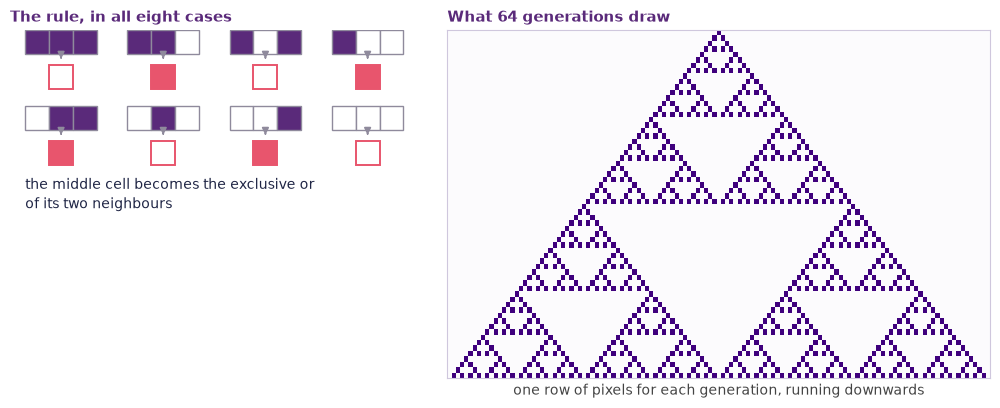
Figure: The rule that gives every cell the exclusive or of its two neighbours, and the triangle that 64 generations of it draw without any triangle being written anywhere.
Rules are one half of the older practice and evolution is the other, and a sketch is a good place to feel it. Give your drawing a small genome: three colours, an angle, a branch count, a line weight. Draw nine variants in a grid, each one the genome with a small random change. The user clicks the variant they like, that genome becomes the parent, and nine fresh mutants are drawn from it. Four or five rounds in you have something you could not have specified in advance and did not draw by hand. That is interactive evolution, and Picbreeder ran the same loop in a browser in 2008 Secretan et al., 2008.
An assistant earns its place here more clearly than almost anywhere else in this chapter. The rewriting engine, the neighbour arithmetic, the grid layout, and the mutation function are fiddly, well documented, and completely uninteresting to get right by hand. Ask for them. What no assistant can do is decide that the angle should be 22 degrees rather than 25, or that the third tile in the second row is the one worth breeding from. The code is delegable and the judgement is not, and in a rule-based or evolutionary sketch the judgement is the work.
Building a tiny AI-powered web tool
By this week you should be able to assemble something like:
- a page where a visitor types a sentence and a generated image appears,
- a sketch that listens to the microphone and reacts in colour,
- a button that produces a short generated story riff on a theme,
- a small tool that sorts a folder of your own files into categories using a local model.
Each of these needs the same four parts, and it is worth naming them because the parts are the same whatever the tool does.
A front end, meaning a page and one file of JavaScript. Keep it to one file for as long as you can. A build system is a thing you will otherwise spend the afternoon configuring instead of making.
A model call, which happens either in the browser or on a server. In the browser is simpler to deploy and limited to small models; on a server you can call any model, and you then have a key to look after.
A key that is not in the page. Anything shipped to the browser is public, including an API key sitting in your JavaScript. This is the single most common mistake in student projects, and it is expensive rather than merely embarrassing. The fix is to keep the key on a server or to use a model that runs locally. Ask your assistant to check for this explicitly, because it will happily write the insecure version if that is what you asked for.
Somewhere to put it. A free static host is enough for anything in this course, and several will also run a small model demo for you.
Source
from matplotlib.patches import FancyBboxPatch

import matplotlib.pyplot as plt
plt.rcParams.update({
    "font.size": 10,
    "axes.titlesize": 11,
    "axes.labelsize": 10,
    "xtick.labelsize": 9,
    "ytick.labelsize": 9,
    "legend.fontsize": 9,
    "figure.figsize": (10, 4),
    "figure.dpi": 100,
    "savefig.dpi": 150,
    "axes.spines.top": False,
    "axes.spines.right": False,
})

navy, purple, rose = "#1f2545", "#5a2a7a", "#e8556d"

fig, ax = plt.subplots(figsize=(10, 4.2))


def panel(x, y, width, height, title, lines, face="#f4f1fa", edge=None):
    ax.add_patch(FancyBboxPatch((x, y), width, height,
                                boxstyle="round,pad=0.02,rounding_size=0.14",
                                facecolor=face, edgecolor=edge or purple, linewidth=1.8))
    ax.text(x + 0.3, y + height - 0.32, title, ha="left", va="center", fontsize=11,
            fontweight="bold", color=navy)
    for index, line in enumerate(lines):
        ax.text(x + 0.3, y + height - 0.78 - index * 0.36, line, ha="left",
                va="center", fontsize=10, color="#444444")


panel(0.3, 1.5, 4.3, 2.1, "In the browser",
      ["a page and one JavaScript file", "what the visitor types and sees",
       "everything here is public"])
panel(7.1, 1.5, 4.3, 2.1, "On a small server",
      ["one function that forwards the call", "the API key lives here",
       "nothing here is shipped to the page"], "#fff0f3", rose)

ax.annotate("", xy=(7.05, 2.9), xytext=(4.65, 2.9),
            arrowprops=dict(arrowstyle="-|>", color=navy, lw=1.8))
ax.text(5.85, 3.05, "the request", ha="center", fontsize=10, color="#444444")
ax.annotate("", xy=(4.65, 2.3), xytext=(7.05, 2.3),
            arrowprops=dict(arrowstyle="-|>", color=navy, lw=1.8))
ax.text(5.85, 2.05, "the result", ha="center", fontsize=10, color="#444444")

ax.add_patch(FancyBboxPatch((7.1, 0.15), 4.3, 0.8,
                            boxstyle="round,pad=0.02,rounding_size=0.12",
                            facecolor="#fbfaff", edgecolor="#cfc7dd", linewidth=1.5))
ax.text(9.25, 0.55, "The model provider", ha="center", va="center", fontsize=11,
        color=navy)
ax.annotate("", xy=(9.25, 1.0), xytext=(9.25, 1.45),
            arrowprops=dict(arrowstyle="<|-|>", color=navy, lw=1.6))

ax.add_patch(FancyBboxPatch((0.3, 0.15), 4.3, 0.8,
                            boxstyle="round,pad=0.02,rounding_size=0.12",
                            facecolor="#fbfaff", edgecolor="#cfc7dd", linewidth=1.5))
ax.text(2.45, 0.55, "A free static host", ha="center", va="center", fontsize=11,
        color=navy)
ax.annotate("", xy=(2.45, 1.45), xytext=(2.45, 1.0),
            arrowprops=dict(arrowstyle="-|>", color=navy, lw=1.6))

ax.text(5.85, 4.05, "A key put in the page is a key you have published",
        ha="center", fontsize=11, fontweight="bold", color=rose)

ax.set_xlim(0, 11.7)
ax.set_ylim(0.0, 4.4)
ax.axis("off")
plt.tight_layout()
plt.show()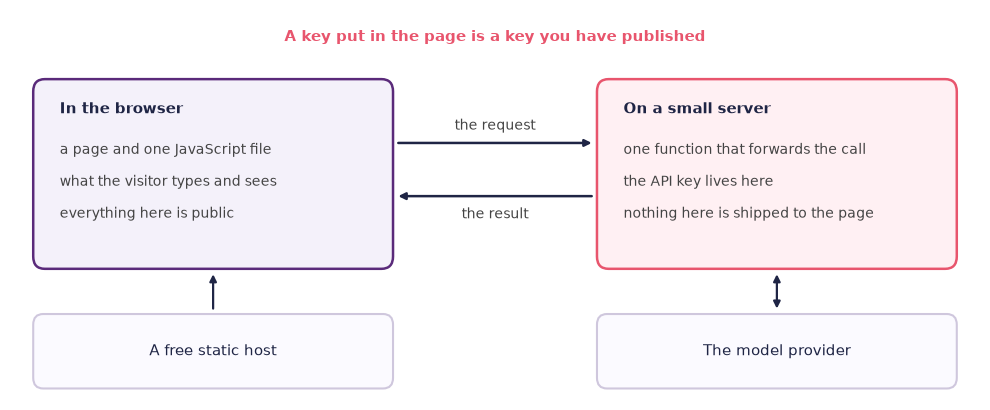
Figure: The four parts of a small web tool, with the key kept on the server because everything shipped to the browser is public.
An assistant can assemble all four in an afternoon. What it cannot do is decide what the tool is for. A tool that does something oddly specific and useful to one person will always be more interesting in an exposition than a general one that does nothing in particular.
Dig deeper: what the assistants are called
The body of this chapter describes categories rather than products, because the categories have been stable since 2023 and the products have not. For the record, and because you will meet the names the moment you start searching: tab completion is most associated with GitHub Copilot, widely credited with bringing the pattern to a mass audience from 2021. Cursor and Windsurf are editors built around chat and inline edit Anysphere, 2024, and Claude Code and Codex CLI are agentic assistants that work from a terminal rather than an editor panel Anthropic, 2024. Cursor’s agent mode is the same pattern inside the editor.
For the tiny web tool, the stack most students end up with is a page and one JavaScript file, built with Vite or Bun if a build step is needed at all. Browser-side model calls go through transformers.js or WebLLM. Hosting is Vercel or Netlify for a static page, or Hugging Face Spaces if you want a demo with a model attached and no server of your own Hugging Face, 2024.
Names in this note are here so that you can search effectively. Do not read the list as a recommendation, and expect at least one entry to be gone or renamed by the time you read it.
This week’s lab: Explore, Reflect, Create
Three movements: get the same small feature from two assistants and compare them, explain a function out loud to someone who will push back, then build a sketch that reacts to the mouse and put it somewhere public.
The proposal for your final piece starts this week. It is a checkpoint, not an assessed assignment: one to two pages plus a feasibility sketch, due in week 10, naming the shape of the final piece and how a reader will meet it in your exposition. Use the Reflect round to say your idea out loud to a partner while there is still time to change it.
Explore (about 30 min)
One feature, two assistants.
- Open the p5.js web editor and paste in the hello-world sketch from this chapter. Confirm it runs.
- Choose one small feature, the same one for both assistants. Something like “make the background fade slowly instead of clearing” or “make the circle grow with the mouse speed” is the right size.
- Prompt two different assistants for an implementation, with the same wording both times. Any two of the four patterns will do, for example a chat panel and a tab-completion assistant, or two different chat assistants in a browser.
- Run both. Note which one is idiomatic p5.js, which chose sensible names, which handled the first frame correctly, and which explained itself when you asked “why did you write it this way?”
- Now ask the weaker one to critique the stronger one’s version. Note whether the critique is useful or merely polite.
- Optional, if there is time: open Glicol, run the hello-world example, and change one number while the sound is playing. Then ask a coding assistant to explain what one line does and to suggest a change, and note whether the suggestion runs.
Two short paragraphs in your log, plus both versions of the code, is enough.
Reflect (about 15 min)
Work in pairs. This is a discussion, not a writing block.
- Take the longest function either assistant produced and explain it back to your partner, out loud, line by line, without looking at any explanation the assistant offered. Your partner’s job is to interrupt at every line you gloss over. Then swap.
- Between you, find one line either of you could not account for. Ask an assistant about that line only, and decide together whether the answer is correct or merely fluent. You will need to run something to settle it.
- Close the round by each stating aloud which path you are taking and what your sketch will do in the Create phase. Add one sentence on the idea for your final piece, including what a reader of your exposition would meet first.
Create (about 45 min)
Take one of the four paths below and publish what you make. Paths A to C are built in the p5.js web editor, and path D is live coded in the browser.
Path A: a mouse-reactive sketch.
- Build a sketch with an assistant that meets at least two of: colour that changes with position or speed; shapes that leave trails or echoes; sound on click; a canvas that responds to window size.
- Iterate at least three times. Ask for a change, run it, read what changed, ask for the next one. Keep the versions, because the sequence is the interesting part.
- After each iteration, write one line in your log saying what you asked for and what you got, including the times those differed.
- Save the sketch publicly and put the link in your log with a sentence saying what you would fix next.
Path B: an evolving sketch.
- Write one drawing function that takes a small genome, meaning a handful of numbers controlling colour, angle, count, and thickness, and draws a single figure from it.
- Draw nine of them in a three-by-three grid, each one the same parent genome with a small random change applied.
- Make a click on a tile promote that genome to parent and redraw the grid. Run at least four generations, keeping a screenshot of each so that the drift is visible.
- Save the sketch publicly and put the link in your log with one sentence on what you found yourself selecting for, which is usually not what you expected to select for.
Path C: a generative text piece.
- Write one function, with an assistant, that assembles a line of text from a few short lists of words and one rule you choose.
- Add a second rule so that the output changes with something outside itself: the time of day, the length of a word the reader types, or the line before it.
- Run it twenty times, keep the five lines you would show somebody, and say in one line what the rule made possible and what it ruled out.
- Save the sketch publicly and put the link in your log with one sentence on the rule you would change next.
Path D: a live-coded piece.
- Open Glicol or Strudel and work from one of the built-in examples until you have a sound worth keeping.
- Build a piece of about ninety seconds that you can perform from a nearly empty editor, and rehearse it three times so that the changes land where you want them.
- Use an assistant only between runs, never during one. Note each thing you asked for and whether you kept what came back.
- Record the screen and the sound together, publish the recording, and put the link in your log with one sentence on what an audience could see that they could not hear.
Optional advanced track: a generative pipeline. Combine an image model from chapter 5, an audio model from chapter 6, and a small script that wires them together. For example, generate four images of a forest in different seasons and a twenty-second ambient track for each, then display all four with their soundscapes on a single page and commit the page to your portfolio. This is a strong candidate component of a final piece.
Optional, for the commons. Look up the tool you built with, or the artist whose work inspired your sketch, on Wikidata, the structured sister project of Wikipedia. If the item lacks a statement you can source, such as the developer, the licence, or the release date, add it by hand with a reference. Wikidata is released under CC0, so every statement you add is free for anyone to reuse, including the companies that train models on it.
At home, write this week’s entry in your practice log using the practice log template.
A critical look: does AI make beginners better programmers?
The claim. Coding assistants remove the pointless part of learning to program. Beginners no longer lose weeks to a missing semicolon, they get to interesting problems in their first session, and everyone who used to be locked out by syntax can now build things. The tool is a ladder into the discipline.
The evidence. Two studies from 2023 are the ones to know, and together they say something more complicated than either says alone. In a controlled study with sixty-nine novice learners aged ten to seventeen, the group given a code generator during a set of introductory programming tasks completed significantly more of them and wrote more correct code than the control group. On a retention test a week later they did not perform worse Kazemitabaar et al., 2023. That result is real, and it is narrower than the claim. The tasks were short and introductory, the follow-up was one week, and the comparison was between having the tool and not having it rather than between two ways of teaching. An observational think-aloud study of university students working with a tab-completion assistant supplies the other half of the picture. It found beginners struggling to evaluate suggestions they had not asked for, accepting code they could not explain, and getting stuck in ways not reported in the earlier literature on novice programmers. One characteristic pattern was confidence unsupported by understanding Prather et al., 2023. More tasks were completed, then, and a real question remains about what was completed in the student.
The method. The two are built differently, and the difference decides what each of them can license. The first is a controlled experiment with a control group and a delayed test, so it can establish that the tool caused the difference in what was completed. It cannot say what those learners will understand in five years, because it did not run for five years. The second is an observational study in which students narrated their work aloud while researchers watched, with no comparison arm. It can describe behaviour nobody had thought to look for, which is exactly what it did, but it cannot tell you how common that behaviour is, because nothing was counted against a baseline. Both are small, both are short, and both were run in a single setting, which is the ordinary condition of research in this area rather than a failing of these two papers. Read them as complementary. One says the tool changes what gets finished; the other says something about what happens in the person while it does. Neither speaks to what you will be able to do in ten years, and the published work says so plainly. The claims made on their behalf, in course descriptions and in marketing, usually do not.
The limits. So the honest version is that assistants clearly help beginners complete more, that the short-term learning evidence is mixed rather than negative, and that the long-term question is open. Whether a generation of programmers who learned this way can debug a system nobody understands is not something a one-week retention test can answer, and it will not be settled before you have finished this course. There is a further limit worth naming: “better programmer” is not one thing. Producing working code, reading unfamiliar code, choosing an approach, and debugging under pressure are separable skills, and there is no reason to expect a tool to move them together. The available evidence is mostly about the first.
This course is arranged around that uncertainty. It grades the practice log and the explaining alongside the artefact, it sets an explain-back exercise every time code appears, and it asks you to account for what you shipped rather than only to ship it. If the deskilling worry turns out to be unfounded, you will have lost very little. If it turns out to be right, the reading is the part that will still be yours.
- Processing Foundation. (2024). p5.js — Tutorials. Processing Foundation. https://p5js.org/tutorials/
- Blackwell, A. F., Cocker, E., Cox, G., McLean, A., & Magnusson, T. (Eds.). (2022). Live Coding: A User’s Manual. MIT Press. 10.7551/mitpress/13770.001.0001
- Lan, Q., & Jensenius, A. R. (2021). Collaborative Live Coding With Glicol Music Programming Language. Zenodo. 10.5281/zenodo.6539832
- Jónsson, B. Þ., Hoover, A. K., & Risi, S. (2015). Interactively Evolving Compositional Sound Synthesis Networks. Proceedings of the 2015 Annual Conference on Genetic and Evolutionary Computation (GECCO), 321–328. 10.1145/2739480.2754796
- Jónsson, B. Þ., Erdem, Ç., & Fasciani, S. (2025). Live Coding the Lineage. Proceedings of the International Web Audio Conference (WAC). 10.5281/zenodo.17642435
- Prusinkiewicz, P., & Lindenmayer, A. (1990). The Algorithmic Beauty of Plants. Springer. 10.1007/978-1-4613-8476-2
- Secretan, J., Beato, N., D’Ambrosio, D. B., Rodriguez, A., Campbell, A., & Stanley, K. O. (2008). Picbreeder: Evolving pictures collaboratively online. Proceedings of the SIGCHI Conference on Human Factors in Computing Systems. 10.1145/1357054.1357328
- Anysphere. (2024). Cursor Documentation. Cursor. https://cursor.com/docs
- Anthropic. (2024). Claude Code Documentation. Anthropic. https://docs.anthropic.com/claude-code
- Hugging Face. (2024). Spaces — Hosted Machine Learning Demos. Hugging Face. https://huggingface.co/spaces
- fourMs Lab. (2026). Musical Gestures Toolbox for Python. https://github.com/fourMs/MGT-python
- Kazemitabaar, M., Chow, J., Ma, C. K. T., Ericson, B. J., Weintrop, D., & Grossman, T. (2023). Studying the effect of AI code generators on supporting novice learners in introductory programming. Proceedings of the 2023 CHI Conference on Human Factors in Computing Systems. 10.1145/3544548.3580919
- Prather, J., Reeves, B. N., Denny, P., Becker, B. A., Leinonen, J., Luxton-Reilly, A., Powell, G., Finnie-Ansley, J., & Santos, E. A. (2023). “It’s weird that it knows what I want”: Usability and interactions with Copilot for novice programmers. ACM Transactions on Computer-Human Interaction, 31(1). 10.1145/3617367
- Shiffman, D. (2024). The Nature of Code (2nd ed.). Self-published. https://natureofcode.com/
- Shiffman, D. (2024). The Coding Train — Generative Art and Creative Coding. YouTube. https://www.youtube.com/@TheCodingTrain