This chapter works at the interface layer of the five layers. The models are the ones you already met, and chapter 10 has just finished adding the last of the input ports. Nothing new happens underneath this week. What changes is what sits between you and the model: instead of writing a prompt and receiving an artefact, you write a brief and receive a sequence of actions that someone has to be accountable for.
A brief is a bounded description of a goal, with enough context to make the result checkable and enough constraint to make the work finishable. Briefs are old technology. Design studios, newsrooms, and film productions all run on them, for the same reason: a brief is the smallest unit of work you can hand to someone whose thinking you cannot supervise line by line. That is precisely the position you are in with an agent, which is why the brief, and not the prompt, is the interface this chapter is about.
Three questions organise the week. What is an agent, mechanically. What can one be trusted with in 2026. And how much of your attention does it cost to supervise, since the answer to that last one decides whether an agent saves you anything at all.
Agentic AI
An AI agent is a system that is given a goal and decides for itself which steps to take. The minimum architecture has three parts, and it is worth being able to name them, because almost every product in this space is a variation on the same three.
- Tools. A language model with things it can call: web search, code execution, a file system, a browser, an external API.
- A loop. The model takes a step, observes the result, plans the next step, and repeats.
- A stopping criterion. The goal is met, the user intervenes, or a budget is exhausted.
That is the whole of it. There is no separate planning module and no reasoning engine bolted on the side. The planning happens in the same next-token machinery from chapter 2. What makes it look like planning is that the output of one pass through the model is fed back in as the input to the next, together with whatever the tool returned.
Agents are not new as an idea. Research systems that pursued goals through action existed decades before generative models, and the ambition has been continuous since. What changed around 2023 is not the architecture but the quality of the component in the middle. Language models became good enough at writing a sensible next step, and, more importantly, good enough at noticing that the last step failed and trying something else. Error recovery is the capability that turns a loop into an agent rather than into an infinite one.
This is also a conceptual shift, and Salma and colleagues give it a useful name: the move from treating a system as an executor of instructions to treating it as a collaborator in a process Salma et al., 2025. Chapter 10 used that distinction as a way of asking for critique. Here it becomes structural. An agent does not answer your prompt, it works on your brief, and the difference shows up in how much of the outcome you can predict when you press go.
Three categories are worth separating, because they have different risk profiles and you will meet all three this week.
- A coding agent works inside a repository, edits files, runs tests, and reads the errors. Its outputs are cheap to check, because code either runs or does not, which is the argument of chapter 9.
- A research agent plans a search, reads sources, and drafts a summary. Its outputs look finished long before they are correct.
- A browser-using agent clicks through interfaces on your behalf. It can act on the world, and the world does not have an undo button.
Whatever the category, the artefact an agent produces is not only the result. It is also the trace: the ordered record of what the agent decided, which tool it called, what came back, and what it did next. The trace is the thing you supervise. A student who reads traces learns more in a week about how these systems work than one who reads only outputs. The trace is where the loop is visible, and where the mistake usually happened three steps before the visible failure.
Source
from matplotlib.patches import FancyBboxPatch

import matplotlib.pyplot as plt
plt.rcParams.update({
    "font.size": 10,
    "axes.titlesize": 11,
    "axes.labelsize": 10,
    "xtick.labelsize": 9,
    "ytick.labelsize": 9,
    "legend.fontsize": 9,
    "figure.figsize": (10, 4),
    "figure.dpi": 100,
    "savefig.dpi": 150,
    "axes.spines.top": False,
    "axes.spines.right": False,
})

navy, purple, rose = "#1f2545", "#5a2a7a", "#e8556d"

fig, ax = plt.subplots(figsize=(10, 3.8))


def box(x, y, w, h, title, gloss=None, face="#f4f1fa", edge=None, colour=None):
    ax.add_patch(FancyBboxPatch((x, y), w, h,
                                boxstyle="round,pad=0.02,rounding_size=0.15",
                                facecolor=face, edgecolor=edge or purple, linewidth=1.8))
    ax.text(x + w / 2, y + h / 2 + (0.18 if gloss else 0), title, ha="center",
            va="center", fontsize=11, fontweight="bold", color=colour or navy)
    if gloss:
        ax.text(x + w / 2, y + h / 2 - 0.2, gloss, ha="center", va="center",
                fontsize=10, color="#e6dff0" if colour == "white" else "#444444")


box(0.3, 3.0, 1.9, 0.95, "A goal")
box(2.9, 2.85, 2.9, 1.25, "Model", "plans the next step", purple, purple, "white")
box(6.6, 2.85, 2.9, 1.25, "Tool", "search, code, files, browser")
box(10.2, 3.0, 1.6, 0.95, "Stop", None, "#fff0f3", rose)
ax.text(11.0, 3.15, "goal or budget", ha="center", fontsize=10, color="#444444")

ax.annotate("", xy=(2.9, 3.475), xytext=(2.2, 3.475),
            arrowprops=dict(arrowstyle="-|>", color=navy, lw=1.8))
ax.annotate("", xy=(6.6, 3.85), xytext=(5.8, 3.85),
            arrowprops=dict(arrowstyle="-|>", color=navy, lw=1.8))
ax.annotate("", xy=(5.8, 3.15), xytext=(6.6, 3.15),
            arrowprops=dict(arrowstyle="-|>", color=navy, lw=1.8))
ax.annotate("", xy=(10.2, 3.475), xytext=(9.5, 3.475),
            arrowprops=dict(arrowstyle="-|>", color=navy, lw=1.8))
ax.text(6.2, 4.0, "call", ha="center", fontsize=10, color="#444444")
ax.text(6.2, 2.85, "result", ha="center", fontsize=10, color="#444444")

ax.add_patch(FancyBboxPatch((2.9, 0.9), 6.6, 0.95,
                            boxstyle="round,pad=0.02,rounding_size=0.15",
                            facecolor="#fbfaff", edgecolor="#cfc7dd", linewidth=1.6))
ax.text(6.2, 1.55, "The trace", ha="center", fontsize=11,
        fontweight="bold", color=purple)
ax.text(6.2, 1.2, "every decision, every call, and everything that came back",
        ha="center", fontsize=10, color="#444444")
for x in (4.35, 8.05):
    ax.plot([x, x], [2.85, 1.85], color="#b9b4c4", lw=1.2, ls="--")

ax.text(6.0, 0.4, "The trace is what you supervise, because the mistake is usually "
        "three steps before the failure.", ha="center", fontsize=10, color=navy)

ax.set_xlim(0, 12)
ax.set_ylim(0.1, 4.5)
ax.axis("off")
plt.tight_layout()
plt.show()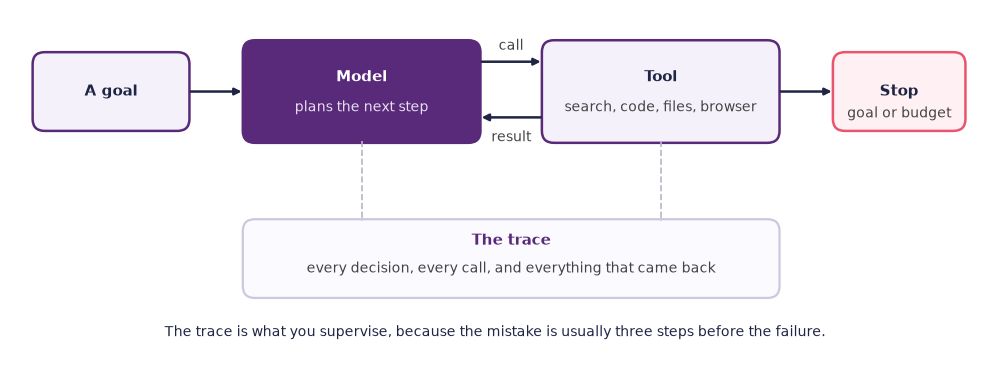
Figure: A goal feeds a model that plans the next step, the model calls a tool and reads the result, and the loop ends at a stopping criterion, with every pass written into the trace.
A creative pipeline as an agent
Take a concrete case. You want to produce a sixty-second animated short. The plan an agent would work through looks roughly like this.
- Story. Ask a language model for three outlines on the brief, and pick one (chapter 4).
- Storyboard. Generate twelve panels with an image model (chapter 5).
- Animation. Run image-to-video on each panel with motion prompts (chapter 7).
- Voice-over. Generate the narration with a speech model (chapter 6).
- Music. Generate a score (chapter 6).
- Sound effects. Generate Foley and ambience.
- Assembly. Place the clips on a timeline, sync the voice-over, mix the audio.
- Render. Export the film.
Every one of those steps is doable today by a separate, focused tool, and you have used most of them already in this course. What is new is that the wiring between them, the exporting and importing and renaming and re-prompting, is itself automatable. Stitching the steps together used to be a producer’s job, and in 2026 that producer is increasingly a loop.
This is not the same claim as “AI replaces a film crew”, and the difference is worth stating precisely rather than diplomatically. Steps 2 to 6 produce material whose quality is a matter of taste, and the agent has none. Step 7 produces a result whose quality is a matter of timing, and the agent cannot hear it. What the agent removes is the mechanical labour between the creative decisions, which is real labour and often most of the hours, but it is not the same as the decisions.
Notice also what the numbered list hides. Written out as eight steps it looks linear, and it is not. Step 3 will produce a shot that contradicts the storyboard, which sends you back to step 2 with a changed brief. A real pipeline is a loop with loops inside it, and the interesting design question is not which steps to automate but where the returns are allowed to land.
Supervising an agent
The hardest part of working with agents is not getting one to run. It is deciding what to let it do, and then checking what it did. Agents can produce an enormous amount of work, some of which is wrong, and the wrongness is not distributed evenly: it concentrates in the steps you were least able to check.
That gives the first and most useful rule: give an agent tasks that are cheap to verify. The point is not that the tasks are easy or small, but that the gap between the work of doing and the work of checking is wide. Running a test suite is cheap to verify, because the suite either passes or it does not. Renaming three hundred files to a stated convention is cheap to verify. “Research the current state of the field and tell me what matters” is not cheap to verify at all, because checking it properly means doing it yourself. When the check costs as much as the task, delegation has bought you nothing, and it has added a plausible-sounding answer you now have to argue with.
Source
import matplotlib.pyplot as plt
plt.rcParams.update({
    "font.size": 10,
    "axes.titlesize": 11,
    "axes.labelsize": 10,
    "xtick.labelsize": 9,
    "ytick.labelsize": 9,
    "legend.fontsize": 9,
    "figure.figsize": (10, 4),
    "figure.dpi": 100,
    "savefig.dpi": 150,
    "axes.spines.top": False,
    "axes.spines.right": False,
})

navy, purple, rose = "#1f2545", "#5a2a7a", "#e8556d"

fig, ax = plt.subplots(figsize=(10, 4.6))
ax.fill_between([0, 1], 0, 1, color="#f4f1fa", zorder=0)
ax.fill_between([0, 1], -1, 0, color="#fdeef2", zorder=0)
ax.axhline(0, color="#b9b4c4", lw=1.4)
ax.axvline(0, color="#b9b4c4", lw=1.4)

tasks = [
    (0.62, 0.55, "run the test suite\non three hundred files", purple),
    (0.35, 0.30, "rename files to a\nstated convention", purple),
    (0.66, -0.45, "research the field and\ntell me what matters", rose),
    (-0.55, -0.35, "write one sentence\nyou could write yourself", "#666666"),
]
for x, y, label, colour in tasks:
    ax.plot(x, y, "o", color=colour, markersize=11)
    ax.text(x, y - 0.09, label, ha="center", va="top", fontsize=10,
            color=colour, linespacing=1.4)

ax.text(0.97, 0.93, "worth delegating", ha="right", va="top", fontsize=11,
        fontweight="bold", color=purple)
ax.text(0.97, -0.82, "delegation buys you nothing", ha="right", va="bottom",
        fontsize=11, fontweight="bold", color=rose)

ax.set_xlim(-1, 1)
ax.set_ylim(-1, 1)
ax.set_xticks([])
ax.set_yticks([])
ax.set_xlabel("how much work the task is to do", labelpad=10)
ax.set_ylabel("how cheap the result is to check", labelpad=10)
ax.text(-0.97, -0.99, "small", ha="left", va="bottom", fontsize=9,
        color="#666666")
ax.text(0.97, -0.99, "large", ha="right", va="bottom", fontsize=9,
        color="#666666")
for side in ax.spines.values():
    side.set_color("#cfc7dd")

plt.tight_layout()
plt.show()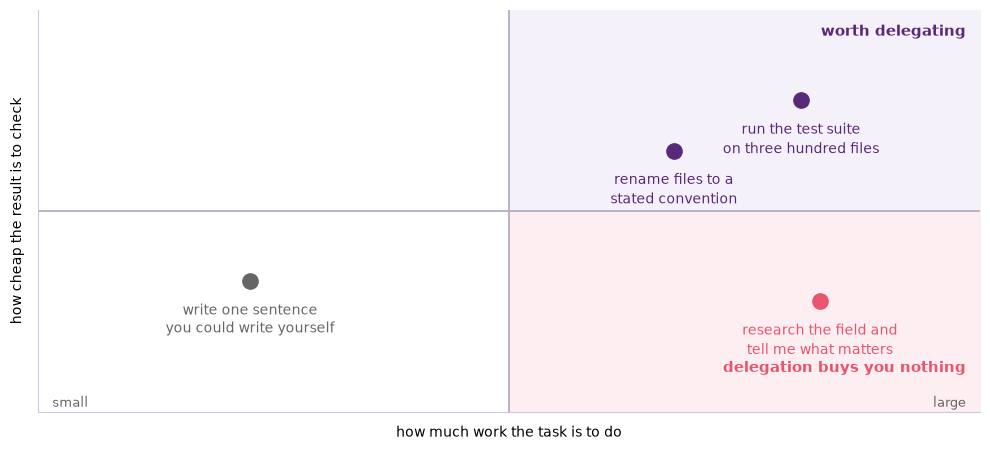
Figure: The tasks worth handing to an agent are the ones where the work of doing is large and the work of checking is small, and the gap between the two is what you are buying.
The second rule is to read the trace, not just the result. Skim the steps in order and look for three things: a change of goal that nobody asked for, a failed tool call treated as a success, and an invented fact that kept the loop going. All three are common, all three are visible in the trace, and none of them is visible in the output, which will read confidently either way.
The third rule concerns permissions. An agent is exactly as dangerous as the tools you gave it. Reading files is safe. Writing files is recoverable if you are in version control and not otherwise. Version control is a system that keeps every past state of your files, so a branch is a copy you can throw away without losing the original. Running arbitrary commands, sending messages under your name, and spending money are three separate powers and each one deserves a separate decision. The practical discipline is to grant the narrowest permission that lets the task finish and to work in a copy or a branch. Treat any request to widen the permissions mid-run as a signal to stop and read what has happened so far.
Source
from matplotlib.patches import FancyBboxPatch

import matplotlib.pyplot as plt
plt.rcParams.update({
    "font.size": 10,
    "axes.titlesize": 11,
    "axes.labelsize": 10,
    "xtick.labelsize": 9,
    "ytick.labelsize": 9,
    "legend.fontsize": 9,
    "figure.figsize": (10, 4),
    "figure.dpi": 100,
    "savefig.dpi": 150,
    "axes.spines.top": False,
    "axes.spines.right": False,
})

navy, purple, rose = "#1f2545", "#5a2a7a", "#e8556d"

powers = [
    ("Read files", "safe", "#f4f1fa", purple),
    ("Write files", "recoverable, if you are in version control", "#f4f1fa", purple),
    ("Run any command", "a separate decision", "#fbeef2", rose),
    ("Send messages as you", "a separate decision", "#fbeef2", rose),
    ("Spend money", "a separate decision", "#fff0f3", rose),
]

fig, ax = plt.subplots(figsize=(10, 4.2))
for index, (name, note, face, edge) in enumerate(powers):
    x = 0.4 + index * 0.55
    y = 0.5 + index * 0.62
    ax.add_patch(FancyBboxPatch((x, y), 5.4, 0.55,
                                boxstyle="round,pad=0.02,rounding_size=0.1",
                                facecolor=face, edgecolor=edge, linewidth=1.8))
    ax.text(x + 0.3, y + 0.275, name, ha="left", va="center", fontsize=11,
            fontweight="bold", color=navy)
    ax.text(x + 5.7, y + 0.275, note, ha="left", va="center", fontsize=10,
            color=edge)

ax.annotate("", xy=(0.15, 3.85), xytext=(0.15, 0.45),
            arrowprops=dict(arrowstyle="-|>", color=navy, lw=2.0))
ax.text(0.02, 2.15, "how much you can lose", rotation=90, ha="right",
        va="center", fontsize=10, color=navy)
ax.text(0.4, 4.2, "an agent is exactly as dangerous as the tools you gave it",
        ha="left", fontsize=11, fontweight="bold", color=purple)
ax.text(0.4, 0.05, "grant the narrowest set that lets the task finish, and grant "
        "each rung on its own", ha="left", fontsize=10, color=navy)

ax.set_xlim(-0.3, 12.4)
ax.set_ylim(-0.1, 4.5)
ax.axis("off")
plt.tight_layout()
plt.show()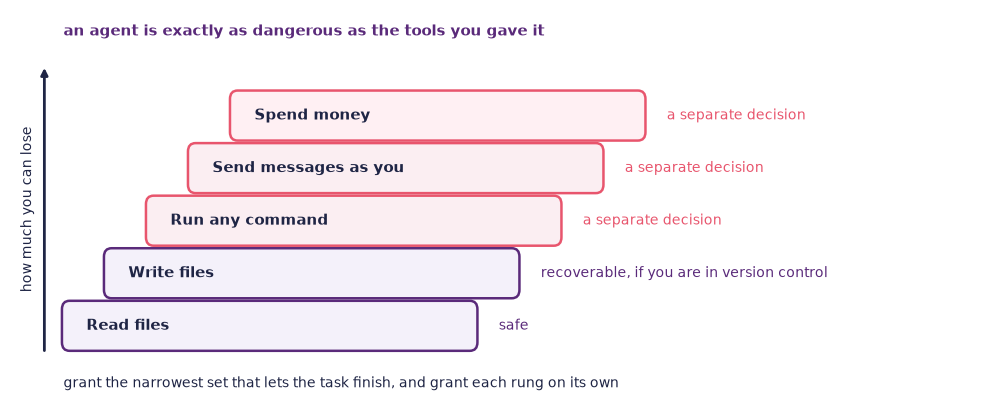
Figure: The powers an agent can be given, in rising order of what a mistake costs, where each rung deserves a decision of its own rather than a single yes.
The fourth is budgets, and there are two of them. The one people notice is money. Each step in the loop is a fresh call to a model, and a long run makes many of them. The total for a substantial task on a commercial API in 2026 is easily an order of magnitude more than a single conversation. Set a spending cap before you start rather than after your first surprise. The budget people do not notice is time, both the agent’s and yours. A loop with no step limit will happily spend an hour going nowhere, and an agent that hands you four hundred lines of output has spent your afternoon rather than saved it.
That leaves one more piece, which is a design decision rather than a safety measure. A human-in-the-loop checkpoint is a point in the pipeline where the agent stops and waits for a person. Put one where the cost of a wrong decision is high and the cost of asking is low. That means before anything irreversible, before anything public, and, in creative work, at every point where the next steps will inherit a choice of taste. In the animated short above, the checkpoint belongs after step 1, because the outline shapes everything downstream and reading three outlines takes two minutes.
Source
from matplotlib.patches import FancyBboxPatch

import matplotlib.pyplot as plt
plt.rcParams.update({
    "font.size": 10,
    "axes.titlesize": 11,
    "axes.labelsize": 10,
    "xtick.labelsize": 9,
    "ytick.labelsize": 9,
    "legend.fontsize": 9,
    "figure.figsize": (10, 4),
    "figure.dpi": 100,
    "savefig.dpi": 150,
    "axes.spines.top": False,
    "axes.spines.right": False,
})

navy, purple, rose = "#1f2545", "#5a2a7a", "#e8556d"
first = ["1 Story", "2 Storyboard", "3 Animation", "4 Voice-over", "5 Music"]
second = ["6 Effects", "7 Assembly", "8 Render"]

fig, ax = plt.subplots(figsize=(10, 4.6))


def step(x, y, w, text, face="#f4f1fa", edge=None):
    ax.add_patch(FancyBboxPatch((x, y), w, 0.8,
                                boxstyle="round,pad=0.02,rounding_size=0.12",
                                facecolor=face, edgecolor=edge or purple, linewidth=1.8))
    ax.text(x + w / 2, y + 0.4, text, ha="center", va="center", fontsize=11, color=navy)


for i, name in enumerate(first):
    x = 0.4 + i * 2.35
    checked = i == 0
    step(x, 3.7, 1.95, name, "#fff0f3" if checked else "#f4f1fa", rose if checked else None)
    if i < len(first) - 1:
        ax.annotate("", xy=(x + 2.35, 4.1), xytext=(x + 1.95, 4.1),
                    arrowprops=dict(arrowstyle="-|>", color=navy, lw=1.6))
for i, name in enumerate(second):
    x = 0.4 + i * 2.35
    step(x, 1.9, 1.95, name)
    if i < len(second) - 1:
        ax.annotate("", xy=(x + 2.35, 2.3), xytext=(x + 1.95, 2.3),
                    arrowprops=dict(arrowstyle="-|>", color=navy, lw=1.6))

step(7.45, 1.9, 4.3, "", "#fff0f3", rose)
ax.text(9.6, 2.45, "Human checkpoint", ha="center", fontsize=11,
        fontweight="bold", color=navy)
ax.text(9.6, 2.1, "after the story step, before the taste is inherited", ha="center",
        fontsize=10, color="#444444")

ax.plot([10.775, 10.775, 1.375, 1.375], [3.7, 3.2, 3.2, 2.7], color=navy, lw=1.6)
ax.annotate("", xy=(1.375, 2.7), xytext=(1.375, 3.0),
            arrowprops=dict(arrowstyle="-|>", color=navy, lw=1.6))

ax.plot([6.075, 6.075, 3.725, 3.725], [4.5, 5.0, 5.0, 4.5], color=rose, lw=1.6, ls="--")
ax.annotate("", xy=(3.725, 4.5), xytext=(3.725, 4.8),
            arrowprops=dict(arrowstyle="-|>", color=rose, lw=1.6))
ax.text(7.0, 4.95, "a contradicting shot sends the brief back", fontsize=10, color=rose)

ax.text(0.4, 5.65, "A creative pipeline an agent can run", fontsize=11,
        fontweight="bold", color=purple)
ax.text(6.0, 0.9, "Checkpoints belong before anything irreversible, anything public, "
        "and any choice of taste.", ha="center", fontsize=10, color=navy)

ax.set_xlim(0, 12)
ax.set_ylim(0.5, 6.0)
ax.axis("off")
plt.tight_layout()
plt.show()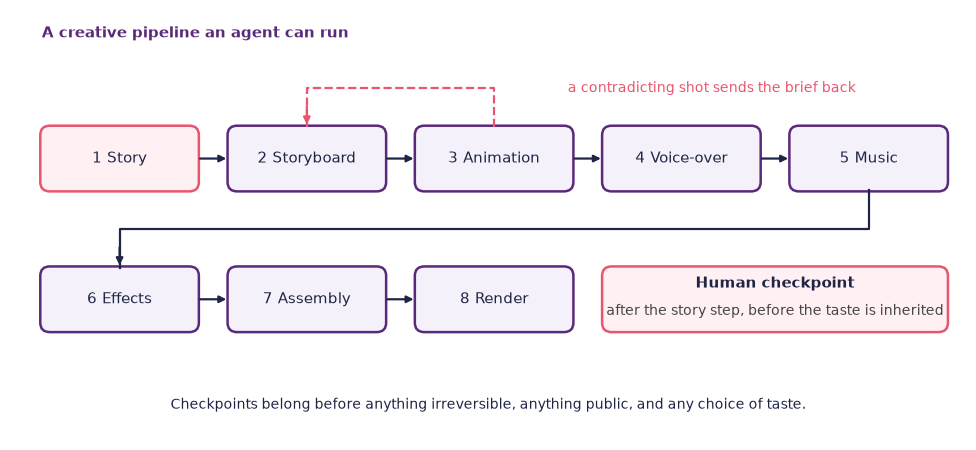
Figure: The eight steps of a creative pipeline look linear and are not, and the human checkpoint goes where a wrong decision would be inherited by everything after it.
Checkpoints are not friction to be minimised; they are where you do your actual job. A pipeline with no checkpoints has not made you more productive, it has made you a reader of finished work you did not choose.
What agents are not
Four corrections, because the marketing is loud and the reality of a first agent run is usually humbling.
They are not magical. How reliable an agent is depends heavily on how long the task is, and the critical look at the end of this chapter takes apart the 2025 study that measured the relationship Model Evaluation and Threat Research, 2025. On anything with many steps, expect to supervise, expect to restart, and treat a clean run as a pleasant surprise rather than the baseline.
Source
import numpy as np

import matplotlib.pyplot as plt
plt.rcParams.update({
    "font.size": 10,
    "axes.titlesize": 11,
    "axes.labelsize": 10,
    "xtick.labelsize": 9,
    "ytick.labelsize": 9,
    "legend.fontsize": 9,
    "figure.figsize": (10, 4),
    "figure.dpi": 100,
    "savefig.dpi": 150,
    "axes.spines.top": False,
    "axes.spines.right": False,
})

navy, purple, rose = "#1f2545", "#5a2a7a", "#e8556d"

steps = np.arange(1, 31)
reliabilities = [0.99, 0.95, 0.90]
styles = ["-", "--", ":"]

fig, (left, right) = plt.subplots(1, 2, figsize=(10, 3.8))

for rate, style in zip(reliabilities, styles):
    left.plot(steps, rate ** steps, color=purple, lw=2.4, ls=style,
              label=f"{rate:.0%} per step")
left.axhline(0.5, color=rose, lw=1.4, ls="--")
left.text(30, 0.53, "half the runs fail", ha="right", fontsize=10, color=rose)
left.set_ylim(0, 1.05)
left.set_xlim(1, 30)
left.set_xlabel("steps in the run")
left.set_ylabel("chance the whole run is right")
left.legend(loc="lower left", frameon=False, title="each step is right")
left.grid(color="#dcd7e4", lw=0.8, ls=":")
left.set_axisbelow(True)

for rate, style in zip(reliabilities, styles):
    right.plot(steps, steps / rate ** steps, color=rose, lw=2.4, ls=style,
               label=f"{rate:.0%} per step")
right.plot(steps, steps, color="#8f8a9c", lw=1.6,
           label="if nothing ever failed")
right.set_yscale("log")
right.set_xlim(1, 30)
right.set_ylim(1, 1200)
right.set_xlabel("steps in the run")
right.set_ylabel("model calls for one run that is right")
right.legend(loc="upper left", frameon=False)
right.grid(color="#dcd7e4", lw=0.8, ls=":")
right.set_axisbelow(True)

for ax in (left, right):
    for side in ("right", "top"):
        ax.spines[side].set_visible(False)

plt.tight_layout()
plt.show()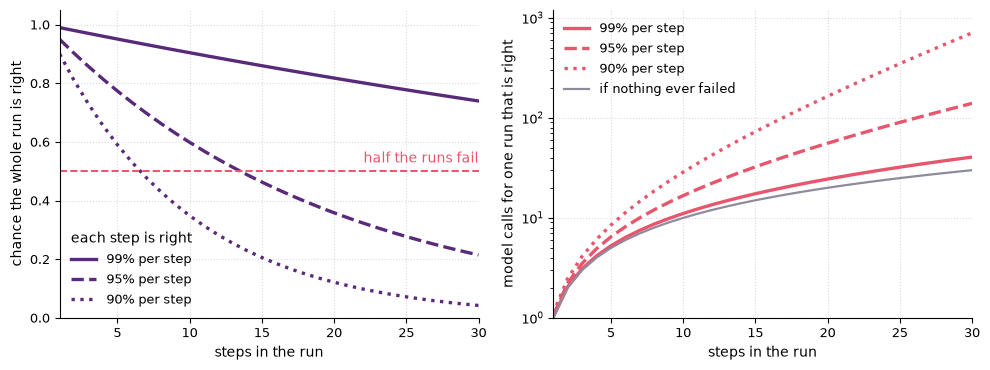
Figure: If each step has a fixed chance of being right, the chance of a whole run being right falls with its length, and the calls needed for one run that is right rise with it. The rates shown are illustrative.
They are not cheap at scale. A single run on a non-trivial task involves many model calls, and the cost of the same work through an agent is typically well above the cost of asking once. That may still be worth it. It is not free, and it is worth knowing the order of magnitude before you loop something a hundred times.
They are not safe by default. An agent with a browser can buy things, send messages, and sign up to services in your name. Read the permissions before you press go, and assume that anything the agent reads from the open web may be trying to instruct it.
They do not have opinions. They have outputs. An agent that says your third outline is the strongest has produced a sentence of the kind that usually follows three outlines. Pretending otherwise is a category error, and it is the specific error that makes people delegate the taste and keep the wiring, which is exactly backwards.
Agents in time
Everything so far has assumed an agent whose loop runs in text and whose clock does not matter. The agent takes a step, waits for a tool, thinks for a while, and takes another. If a step takes four seconds instead of one, nothing is lost but patience.
Now put the same loop inside a piece of music. The three parts do not change: there are tools, a loop, and a stopping criterion. What changes is that the loop acquires a deadline. A rhythmic response that arrives a few tens of milliseconds late is a different musical event from one that arrives on time, and one that arrives two seconds late is not a response at all. Perception, not the programmer, sets the budget.
This shifts every design decision in the chapter. Planning gets cheap or it does not happen, so the elaborate deliberation that a text agent can afford between steps is unavailable. The stopping criterion stops being “the goal is met” and becomes “the next beat has arrived”, which means the agent must always have something to play, including when it has not worked out what. And supervision cannot be a checkpoint, because there is nowhere to pause. You supervise a real-time agent the way a bandleader supervises a player, by changing what you do and hearing what comes back.
The interesting consequence is that the pipeline model of this chapter, a chain of steps with checks between them, is only one shape an agent can take. The other shape is a participant, a system that is always in the middle of the loop. Its contribution is judged by whether it fits rather than by whether it is correct, and it cannot be evaluated at all except while it is running. Chapter 12 takes up that second shape in earnest, with bodies, sensors, and rooms. The research spotlight later in this chapter is the bridge.
Where this is going
By the late 2020s the centre of gravity of generative AI is moving from “produce one artefact from one prompt” to “complete one task using many tools over time”. That is a larger change than it first looks, because it moves both the work and the value. The work is still yours, but you do it as a director rather than as a maker. The value sits in the brief, the supervision, and the taste, which are the three things the loop cannot supply.
For students this collapses into one piece of practical advice: become very good at writing briefs. A good brief states the goal, the constraints, and what finished looks like. It says what the result is for and who will see it, so that the system has a criterion rather than a topic. It names what must not happen. And it is honest about which decisions are open, because a brief that pretends to be open when you have already decided will produce three variants you were never going to use.
That skill is not new and it is not technical. It is what a commissioning editor, an art director, and a supervisor have always done, and it transfers directly. What is new is that in 2026 a person who can write a great brief, and read a trace carefully enough to know when it went wrong, can ship work that used to require a team.
Dig deeper: a three-step agent
The body of this chapter uses categories rather than product names, because the categories have been stable since 2023 and the products have not. For the record, and so that you can search effectively: agent frameworks that let you build a loop yourself include OpenAI’s Agents SDK and LangGraph. Both give you tool definitions, a loop, and a way to inspect the trace. Terminal-based coding agents include Claude Code Anthropic, 2024; browser-using agents include OpenAI’s Operator OpenAI, 2025; and the early open experiments that made the pattern visible were AutoGPT Significant Gravitas, 2023 and BabyAGI Nakajima, 2023, both from 2023.
If you take the optional code track in this week’s lab, the target is three steps and no more. Search for a paper, summarise it, write a one-sentence headline. Define one tool per step, print the trace, and stop the loop after a fixed number of iterations. Expect a useful sketch rather than magic, and expect the interesting part to be the trace.
Do not read the list above as a recommendation, and expect at least one entry to be renamed or gone by the time you read it.
This week’s lab: Explore, Reflect, Create
Three movements: run one agent on one bounded task and read every line it produced, argue with a partner about what you would delegate, and turn your own project into a supervised pipeline.
There is no compulsory assignment due this week. Partners review your portfolio draft in week 12, and you hand it in during the exam period, so the pipeline you draw today should be the one you are actually going to build.
Warm-up (about 10 min, optional). Draw the loop on paper: three boxes labelled plan, act, and observe, with an arrow back from observe to plan. Take a toy task, such as finding the cheapest train to Bergen next Tuesday, and step through the loop three times by hand, writing down what the agent plans, what it does, and what comes back. Make one of the three observations noisy, so that what comes back is incomplete or wrong, and watch what the next plan does with it. That is the moment you are looking for: where the loop commits to a wrong step and everything afterwards is downstream of it. If the Agent loop simulator is available by the time you read this, run the same exercise there and change the stopping criterion as well.
Explore (about 30 min)
One agent, one bounded task, one trace read end to end.
- Get access to a coding agent or a research agent. Any of the categories in Agentic AI will do, and the university’s approved tools are listed on the tools page. If no agent tool is available to you, use the research mode of a chat assistant. It runs the same loop, calls the same kind of tool, and prints the trace this exercise is about.
- Give it one bounded task with a cheap check. Good candidates: make a small script do a stated thing and pass a test you wrote first; find five sources on a narrow question and give the exact quotation that supports each claim. Write the check down before you start.
- Run it once. Do not intervene, even when you can see it going wrong, unless it is about to do something irreversible.
- Read the whole trace, in order, from the first step to the last. Mark every step as sound, wasteful, or wrong.
- Find the first wrong step, which is rarely the one where the failure became visible. Write one sentence on what the agent believed at that point and where the belief came from.
- Note the run’s cost in whatever units your tool reports: steps, tokens, money, minutes. You will need the number in Reflect.
Reflect (about 15 min)
Work in pairs. This is a discussion, not a writing block.
- Show each other your traces and your first wrong step. Decide together whether a checkpoint could have caught it, and where exactly it would have gone.
- Take your final pieces in turn. List the steps each of you would delegate and the steps you would keep, and say for each delegated step what the cheap check is. If you cannot name the check, move the step back into the keep column.
- Argue about one permission you would never grant an agent working on your project, and why. Push each other for the specific harm rather than a general unease.
- Take a profession where a creative decision has to satisfy something outside itself: a ship’s bridge that must be readable in a storm, a hospital sign, or a rescue plan drawn under time pressure. Say which constraints the agent could be told about, and which it could not be trusted to respect.
- Close by each stating the one slice you are going to run in the next 45 minutes. Name it concretely enough that your partner could hold you to it afterwards, which is what stops you choosing the slice you already know will work.
Create (about 45 min)
Turn your final piece into a supervised pipeline, then run one slice of it for real.
- Draw the pipeline. Every step from nothing to finished piece, as a diagram on paper, a whiteboard, or a diagramming tool. Linear is unlikely; draw the returns.
- Annotate every step with six things: which model or tool, what goes in, what comes out, how you would verify the output, what happens when it fails, and whether there is a human checkpoint here.
- Mark the checkpoints deliberately. At least one, before something irreversible or before a choice of taste that everything downstream inherits. Say in a sentence what you would be looking at when you stopped.
- Split the diagram into steps you will delegate and steps you will keep, and shade them differently. This is the finding, not the decoration.
- Run one slice. Take a single delegated step, or the three-step chain from the Dig deeper note, and actually run it. Keep the trace.
- Write fifteen lines on what the slice cost, what you had to check, and whether the delegation was worth it. An honest no is a result.
- Commit the diagram, the trace, and the notes to your portfolio.
At home, write this week’s entry in your practice log using the practice log template.
A critical look: can agents complete real creative tasks?
The claim. Agents can now do a producer’s job. The pipeline earlier in this chapter is the argument in its strong form. Every individual step has a tool, and a model can call tools in a loop, so the coordinating work that used to need a person is now automatable. What remains for you is the brief at the top and the approval at the bottom. Product demonstrations from 2025 onwards show exactly this, a goal typed once and a finished artefact some minutes later.
The evidence. The most careful public measurement of the underlying capability comes from a 2025 study that asked a deliberately awkward question: not what fraction of tasks a model can do, but how long a task it can do Model Evaluation and Threat Research, 2025. The unit is the time a skilled human takes. The headline finding has two halves and both matter. The length of task that models complete with even coin-flip reliability has been growing fast, with a doubling time measured in months rather than years, which is the half that gets quoted. The other half is that within any single model, success falls sharply as tasks get longer, so a system that is dependable on a task of a few minutes is unreliable on one of a few hours. Long autonomy is not around the corner because short autonomy works.
The method. Look at how that number was produced, because the construction is where the caution lives. The tasks are software engineering and research tasks with clear success criteria, and the human baseline is a timed measurement of skilled people doing the same work. Both choices are deliberate and both are necessary: you cannot express a capability in units of human time without timing humans, and you cannot score a long autonomous run without a criterion that a script can apply. But those choices select the tasks. Nothing in the study is a creative task, nothing has an ambiguous finish line, and the tasks were performed in isolation rather than inside somebody’s ongoing project with its accumulated context. Ask of any agent benchmark: who was timed, on what, and would the task still be scorable if the answer were a matter of judgement.
The limits. Two things follow for creative work, and they point in opposite directions. The first is that the trend is real and the doubling is fast, so a capability judgement you make in 2026 will expire, and the honest form of any statement in this chapter is “as of this year”. The second is that creative pipelines are the hard case for exactly the reason the study is clean. Their success criteria are soft, so the automatic check that made the measurement possible does not exist, and its absence is not an engineering gap but the nature of the work. In practice this means the binding constraint on delegating creative work is not the model’s task length. It is your supervision capacity: the number of traces you can read carefully in an afternoon, the number of outputs you can judge before your judgement goes flat. That is the real budget, it is smaller than you think, and it is the one thing on the list that does not double every few months.
- Salma, Z., Hijón-Neira, R., & Pizarro, C. (2025). Designing Co-Creative Systems: Five Paradoxes in Human–AI Collaboration. Information, 16(10), 909. 10.3390/info16100909
- Model Evaluation and Threat Research. (2025). Measuring AI ability to complete long tasks [Techreport]. https://arxiv.org/abs/2503.14499
- Anthropic. (2024). Claude Code Documentation. Anthropic. https://docs.anthropic.com/claude-code
- OpenAI. (2025). Introducing Operator. OpenAI. https://openai.com/index/introducing-operator/
- Significant Gravitas. (2023). AutoGPT: An Autonomous GPT-4 Experiment. GitHub. https://github.com/Significant-Gravitas/AutoGPT
- Nakajima, Y. (2023). BabyAGI: An Autonomous Task-Driven AI Agent. GitHub. https://github.com/yoheinakajima/babyagi
- RITMO. (2022). Dr. Squiggles: an interactive musical robot. https://www.uio.no/ritmo/english/projects/dr-squiggles/
- Krzyżaniak, M. (2021). Musical robot swarms, timing, and equilibria. Journal of New Music Research. 10.1080/09298215.2021.1910313
- Karpathy, A. (2025). Software Is Changing (Again). https://www.youtube.com/watch?v=LCEmiRjPEtQ